
For many years, Frequently Asked Questions have been a useful way to answer common customer questions and help people find information quickly.
They also have another potential benefit by making your website content easier for AI tools and large language models (LLMs) to understand and potentially reference your site in their answers.
People are increasingly asking tools such as ChatGPT, Google’s AI-powered search and other AI assistants questions that they might previously have typed into a traditional search engine. These tools rely on clear, useful and trustworthy information when generating their responses. A well-written FAQ can help provide that.
But FAQs shouldn’t be added purely for AI, and should be made to make pages easier for human visitors to scan, navigate and understand.
One of the biggest advantages of FAQs is their simplicity. A clear question followed by a direct answer is easy for people to scan, particularly on longer pages where they may be looking for one specific piece of information.
That same structure can also help AI tools understand the content of a page. Rather than having to interpret an answer buried within several paragraphs, an FAQ makes both the question and the answer explicit.
This is especially useful when the questions reflect the way people naturally search, such as “How long does a divorce take?”, “What is a trade mark?”, “How long does it take to get a boiler installed?” or “Are sliding and bifold doors suitable for UK homes?”
We have used this approach across client websites in different ways. For one client, we created a dedicated FAQ area that grouped questions to specific areas of their business. The result is useful content that helps visitors quickly find answers to specific questions, while also giving search engines and AI tools a clear question-and-answer structure to interpret.
You don’t necessarily need to create one large FAQ page. In many cases, it makes more sense to add FAQs where they are most relevant to the reader.
That could be at the bottom of:
On some sites having a large FAQ resource makes sense because there might be hundreds of questions spanning business areas, products ranges etc. This will need organisation so users can browse questions relating to a particular subject.
For other websites, FAQs can work well as an extension of an individual article, so on some client blogs, we’ve added short FAQ sections at the end of articles to answer related questions a reader may still have. These often expand on the main topic rather than repeating it, helping visitors find useful answers quickly while also giving search engines and AI tools clearly structured content to interpret.
The starting point should always be a question that someone might genuinely ask.
That could come from customer enquiries, conversations with a sales team, Google Search Console data, keyword research or questions that regularly come up when discussing a product or service.
Then answer the question clearly. There is little value in adding an FAQ purely because you want another keyword on the page. The answer should contain something useful and, where possible, be specific enough to make sense on its own.
For example, rather than:
“Are bifold doors a good option?
Yes, bifold doors are a great addition to any home. Contact our team to find out more.”
A more useful answer would explain why they may be suitable, what benefits they offer and any important considerations.
This is better for the person reading the page, but it also gives an AI tool much more useful information to work with.
FAQs can make it easier for AI tools to identify useful information because the content is already structured around a specific question and answer.
That doesn’t mean adding FAQs will automatically result in your website being referenced by ChatGPT, Google or another AI platform. There are many factors involved in how AI tools select and present information.
What FAQs can do is make your content easier to interpret and extract.
A strong FAQ answer should ideally:
That last point is particularly useful. If an answer is clear without relying heavily on the surrounding page, it is easier for both a reader and an AI tool to understand.
It also helps to include information that is genuinely useful or distinctive. First-hand experience, specific examples, figures, processes and expert insight can make an answer more valuable than generic content that could appear on almost any website.
FAQs are not a new SEO tactic, but the way people discover information is changing.
A well-written FAQ can help someone quickly find the answer they need, make a longer page easier to scan and give AI tools clearer information to work with.
The key is to start with the questions your customers are actually asking, provide useful and direct answers, and place them where they naturally support the rest of the content.
Done well, FAQs make your website more useful for people while also making your content easier for AI tools to understand.
By using the FAQ schema, you can make it much easier for AI and search engines to identify and understand your FAQ content. The schema is structured code marks each question and answer within a page, and looks similar to this:
<script type="application/ld+json">
{
  "@context": "https://schema.org",
  "@type": "FAQPage",
  "mainEntity": [
    {
      "@type": "Question",
      "name": "What does FAQ stand for?",
      "acceptedAnswer": {
        "@type": "Answer",
        "text": "FAQ stands for Frequently Asked Questions"
      }
    }
  ]
}
</script>
You may have seen some noise online about Google making its “biggest update in 25 years.” That’s not clickbait. Something genuinely significant has happened, and if you’re running Google Ads, it’s worth understanding what’s changed and what to do about it.
Google has introduced something called AI Mode. Instead of returning a list of links when someone searches, Google now generates a conversational AI answer directly on the page. Think of it less like a search results page and more like asking a knowledgeable assistant a question.
This has two big consequences for advertisers:
Google has also launched a new product called AI Max, which sits alongside Performance Max and Demand Gen as part of what they’re now calling the “Power Pack.” AI Max supercharges existing Search campaigns with AI-driven targeting and a new “AI Brief” feature that lets you guide how your ads are presented, rather than specifying exact headlines.
The honest answer is that control is reducing. Google’s AI is taking more of the decisions that advertisers used to make manually. That’s uncomfortable, but it’s the direction of travel, and it is not reversing.
There’s also a new metric worth knowing about called Attributed Brand Searches (ABS). It shows how many people searched for your brand after seeing one of your ads. As the funnel gets messier and attribution becomes harder, this becomes a useful indicator of whether your advertising is building brand awareness.
Here’s where it gets more nuanced. The picture in the UK and EU is different from the US right now. AI Mode isn’t fully rolled out here yet, and ads within AI Mode are currently limited in European markets due to privacy regulations. That gives you some breathing room.
This doesn’t mean you should sit back and wait. It means you have a window to understand what’s coming, watch how it performs in the US, and make considered decisions rather than reactive ones.
Start the creative conversation. Google’s AI needs good-quality content to work with. Videos, images, strong website copy and well-structured landing pages are no longer nice-to-haves. They directly affect how your ads are assembled and where they appear. If your creative assets are thin, this is the time to address that.
Review your campaign mix. If you’re running lower-funnel Search-only, the new landscape will hit you harder than it will advertisers with a broader setup. It’s worth at least understanding where Performance Max or Demand Gen might fit in your account.
Don’t restructure in a panic. AI Max is still relatively new and the evidence on performance is still coming in. We’d recommend a test-and-learn approach before committing significant budget to new campaign types.
Keep an eye on your Search Impression Share. If it starts to fall without an obvious reason, AI Mode displacement is a likely culprit.
Google is moving fast, and the level of control advertisers have over Search campaigns is shrinking. That’s a genuine challenge. But the fundamentals haven’t changed: campaigns built on strong creative, clear audience understanding, and sensible structure will outperform those that aren’t, whatever the platform decides to do next.
If you want to talk through what this means for your specific campaigns, get in touch and we can take a proper look.
Santa Claus is coming to town! As the festive season approaches, the online world gets busier and so do your customers. To make sure your website is ready to sleigh this Christmas, we’ve taken a little inspiration from the festive songbook.
Here’s how to get your website firmly on the Nice List this year…
Keep an eye on your website’s performance.
Page speed, mobile responsiveness, and uptime can make or break the user experience during busy shopping periods. A slow or buggy site will send visitors clicking elsewhere faster than you can say “Ho ho ho”
Make sure any new images you’re adding are optimised for both size and format, check your site on your phone to make sure it’s useable on smaller screens and make sure you have reliable hosting and support.
Don’t lose leads because of confusing navigation or unclear calls-to-action.
Visitors should be able to find what they need and take action without frustration. Whether that’s completing a purchase, filling out a form, or finding a phone number, each step should be simple and intuitive.
Make sure your calls-to-action are clear, consistent, and festive if appropriate (think “Book your Christmas slot” or “Select Christmas Gift Wrap”).
Avoid neglecting your content!
Outdated, inconsistent, or uninspiring copy can leave visitors less than merry. Fresh, engaging content helps your site rank better in search engines and AI services, exposing you to new potential customers.
Make sure you update your homepage occasionally, and you can target your blog with seasonal flair. However, remember to keep it authentic and on-brand.
Your audience is coming and they will be checking you twice before choosing where to spend their money.
Make sure your website feels trustworthy and welcoming. Ensure your contact details are easy to find and can you use review platforms such as Feefo or Trustpilot for authenticated feedback. If not include recent testimonials and / or case studies.
Show your credibility front and centre as it can make all the difference when customers are deciding who’s on their nice list.
Make sure your search engine optimisation is carried across all the content you’re adding.
That includes alt text, headings (especially your H1s), and keyword-rich copy. The small details that help search engines understand and reward your site.
Keep SEO best practices in mind whenever you add new pages, blogs, or products.

If your site still uses outdated design elements, broken links, or slow-loading images, it’s probably landed itself on the naughty list. On the other hand, clean design, clear messaging, and seamless functionality? That’s pure nice-list energy.
What would a first-time visitor think of your site in the first five seconds?
Christmas is one of the busiest times online and one of the best opportunities to connect with your existing and new audiences. Make sure your website is ready to greet them with festive warmth, smooth functionality, and content that truly converts.
After 12 years of building websites, I’ve learned something that surprises a lot of business owners: the best-performing sites are never actually finished. They are constantly evolving, adding new features, and getting smarter about how they serve the business.
In spite of this, most businesses treat launch day like crossing the finish line.
A business might launch a beautiful new website — with a clean design, compelling content, and a structure that fits its goals perfectly at the time. It’s a strong foundation and a smart investment. But as the business evolves – with new products, shifting customer needs, or internal changes – the site can slowly drift out of sync. A year later, visitors may struggle to find the right product because the navigation no longer reflects the current offering. Eighteen months on, small inefficiencies such as a lengthy checkout process can start to impact sales. It’s not the original site that failed – it’s just that the business moved forward, and the website didn’t keep up.
The websites that really work for businesses aren’t just maintained – they’re continuously improved with features that solve real problems.
Features such as:
These aren’t just “nice to haves” – they are competitive advantages.
Maybe you have expanded your product range, entered new markets, offer new services or refined how you operate. If your website hasn’t kept pace, it may still reflect where you were, not where you are now.
My husband was recently shopping for motorbike gear on two different sites selling the same brands. One let him filter by jacket type, size, brand, colour, zip length – he found exactly what he wanted in seconds. The other site? Just page after page of scrolling. You can guess which one got his order.
When you started, maybe you were targeting one type of customer. Now you serve three different markets, but your homepage still talks to everyone in the same way. Different landing pages or targeted content could speak to each group properly.
Businesses often think website improvements mean expensive redesigns. But actually small, strategic changes usually beat big redesigns.
So what changes should you make? The answer lies in your website user data.
Once your site is live, you can see exactly how people use it – what’s working, what they’re missing, and where small changes could make things easier. Acting on real user behaviour means you don’t have to guess what to change.
Heat mapping shows where people click. Analytics reveal where they drop off your conversion funnel. User feedback highlights frustration points. This data is incredibly valuable, but only if you make improvements based on it.
The most successful websites are the ones where we regularly review this data and make targeted improvements. This doesn’t require major overhauls, but strategic enhancements applied over time that solve specific problems. Armed with this insight, you can make improvements that keep you ahead of the competition.

Your site doesn’t need every bell and whistle to compete, but don’t let competitors look better than you. If their website is much easier to use, customers will go there instead.
The smart approach? Small updates as you go. Web standards evolve constantly, but incremental improvements beat expensive emergency fixes. Fresh content helps with search visibility. A modern design shows you’re active and credible. Improved navigation will stop people from getting frustrated and leaving.
Small, data-backed improvements will often outperform complete redesigns.
We worked with Stephens Scown Law Firm to build an information hub that pulls together their content – articles, videos, FAQs, and news – organised by legal topics with links to the team members who wrote them. When they posted timely articles about the pandemic, their organic traffic jumped 236% compared to the previous month, then a further 78% the month after.
That’s what happens when you make valuable, relevant content easy to find at exactly the right time.
With Anglian Pumping Services, we redesigned their site and doubled their conversion rate. But more wins came from the ongoing improvements we’ve made since launch: adding smart search to help customers find products faster, implementing click-and-collect services, and integrating with their accounts software to save hours of admin work each week. Each addition solved a real business problem and made their site work harder for them.
Your website works best when it’s treated as a living business tool, not a static digital brochure. That’s exactly what we help businesses do.
We take existing sites and turn them into tools that drive results – whether that’s improving navigation, creating resource hubs, or building features that solve real customer problems.
Talk to us to see how we can help turn your website into something that works harder for your business – exactly where your customers need it most.
Don’t get me wrong – blog articles have their place. They’re great for SEO, they help drive traffic, and they give your brand a voice. But I’ve got a bit of a bone to pick with how we treat blogs, especially when it comes to valuable content.
Here’s the issue: a lot of really great content gets written as a blog post… and then just sits there. Buried under newer posts, forgotten in the archives, or lost in a sea of tags and categories. Meanwhile, your actual website is missing out on that value.
Let me explain…

Someone writes an amazing tutorial, a detailed explainer, a killer how-to guide, or a breakdown of your product’s best use case – and where does it go? The blog.
Six months later, that post is nowhere near the homepage, it’s not linked from any key product pages, and unless someone searches the exact right keywords, they’ll never find it.
It’s like building a beautiful new room in your house… but only giving access to it through a tiny attic door not many people use.
If you’ve got content that answers your customers’ biggest questions, shows off the power of your product, or genuinely helps people understand your space better – it shouldn’t be buried in the blog. It should live right on your main site.
These things shouldn’t be treated like throwaway blog posts. They should be structured into your site’s information architecture, linked from key pages, and presented as a permanent and valuable part of your site.
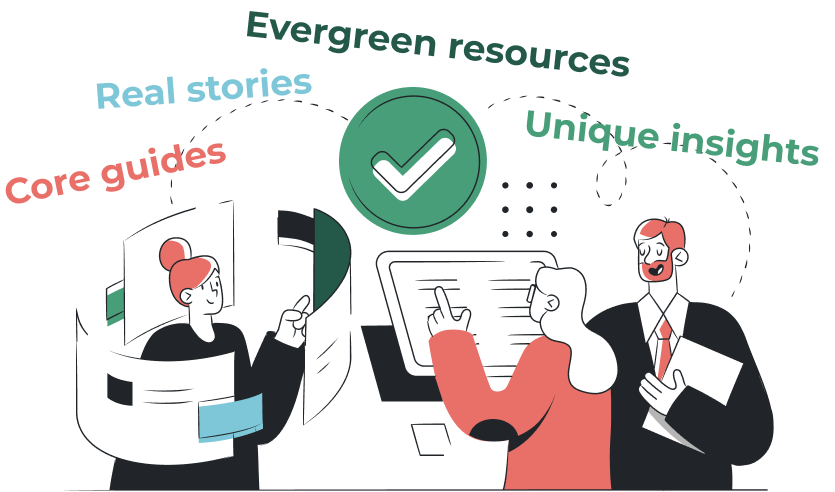
Your blog shouldn’t be a graveyard for good ideas – it should be a launchpad. Start thinking about how to elevate your best content into the main structure of your site. That could mean:
The goal is to weave content into the user journey – so visitors see it when they need it, not just if they happen to browse your blog archives.

Too often, blogs become a dumping ground for “content for content’s sake.” A checklist item. Just publish something. But when you shift your mindset and start thinking about content as a core part of your product or service – not just your blog – you change the game.
Instead of writing 50 blog posts a year and forgetting most of them, why not create 10 amazing evergreen resources and actually build them into your site?
Blog posts aren’t bad. They’re essential in many ways. But let’s stop letting our best content get buried.
Start asking: “Should this live in the blog – or should this be a core part of the site?”
If you’ve got blog content you’re proud of, that’s awesome. Now let’s make sure it’s actually working for you and your customers.
We help businesses take their best-performing, most valuable content and turn it into formats that actually guide decisions, drive engagement, and improve user experience – whether that’s a landing page, learning centre, explainer video, interactive guide, or something else entirely.
Talk to us to see how we can help turn your great content into something even more powerful – right where your customers need it most.
Google search results pages continue to evolve. Looking at a search results page today will often look different to a year ago, five years ago and a decade ago. Typically these changes, especially when the search is transactional (someone looking to buy something) have often favoured Google Ads results where businesses pay to see their site placed highly in a text ad or a shopping ad.
The recently introduced AI Overview, where Google uses their Gemini AI to provide an answer at the very top of the search results page now appears in many searches. Recent data suggests that AI in Search is having a drastic impact on question or informational searches which were once more organic results, without paid ads bearing down on them. It’s likely that these AI Overview’s could be impacting businesses more than users switching to ChatGPT for their research, as the AI Overview doesn’t link through to your website.
Here is a quick rundown of some of the elements on a Google results page:

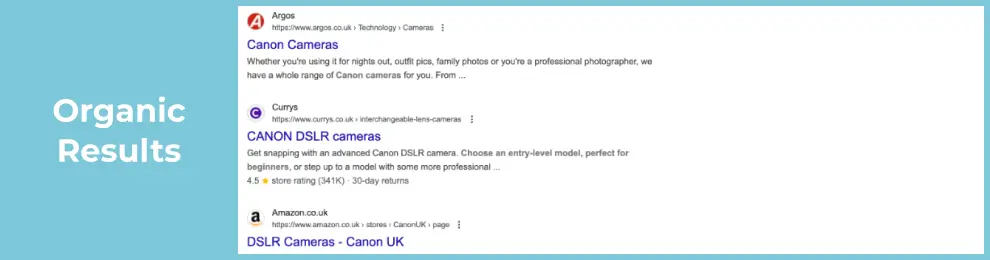
These are the non-paid listings and are based on Google’s algorithm assessing the relevance and authority of your webpage. This is where a blog / news / article strategy can help your business giving you the opportunity to provide highly relevant information to your target audience like these from some of our clients: planning permission considerations, wedding trends and the difference between indemnity and liability.
Displayed at the top or bottom of the results page, these ads are marked as “Sponsored” and are typically used for transactional searches to promote products or services and are often a quick way to traffic and leads. Often starting small, establishing a working metric for cost per sale or cost per lead allows you to scale up once you’ve proven the channel.

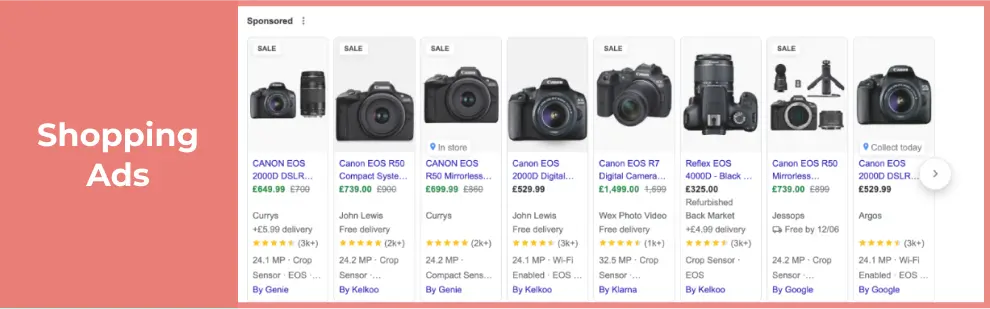
These visual ads showcase your ecommerce products with images and importantly price. These can be a great way to show your catalogue and pre-qualify some of the traffic reaching the site by showing both the goods and the price of the goods before someone clicks.
A relatively new feature (one year ago) that provides an AI-generated summary directly in the results. It’s hard to measure the impact by being in these results as it doesn’t guarantee a click and users may just read the information and be satisfied by the answer.

For businesses with a physical presence and serving customers at their location, a Google Maps listing can help you with local traffic displaying images, location, opening hours and reviews in the results page.
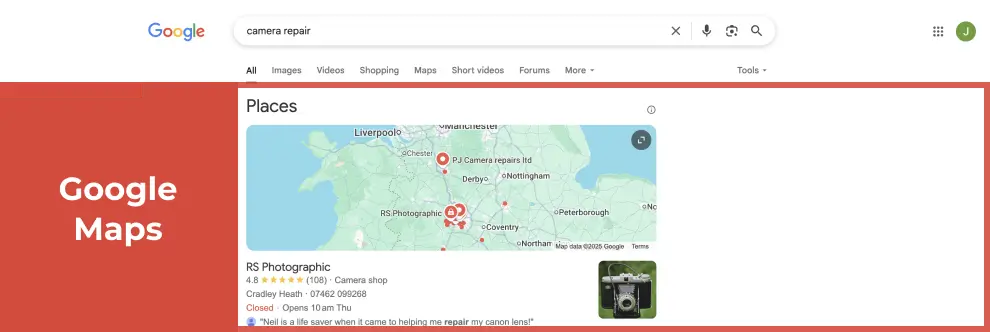
Overall, to succeed you will need a broad search strategy and not to rely on any one type of search result, especially as the ground is constantly changing. If you’d like to discuss any of the above, get in touch.
As the days start to lengthen and it feels like we’re edging out of winter we all look forward to the new life and freshness of spring. Does your website feel the same or is this a good opportunity for a bit of housekeeping to make it spring fresh?

It is natural in business that staff will periodically move on, either to other roles within your business or elsewhere.
When did you last review the list of users with access to your website’s administration area to ensure that only staff with a current business need have access?
Leaving accounts active for staff no longer employed can lead to severe problems, The British Museum had a disgruntled ex-contractor return and use their, still active, access to shut down a number of exhibits ahead of a busy weekend. If their access been revoked promptly they would not have been able to do so. For e-commerce sites you also have a duty of care to the personal data of your customers, per the GDPR legislation.
For WordPress sites, this is as simple as viewing the Users list in the admin and checking that all those under the Administrator, Shop Manager or Editor tabs still need access, and revoking or deleting any who are no longer needed.
From a security point of view you should avoid sharing logins and each staff member should have their own username and unique password for each site.

When did you last change your website admin login’s? Could anyone else know what that password is or is it even in use elsewhere? It is good practice to rotate (i.e. re-generate) passwords periodically to avoid any old record of it escaping your control. Most importantly, ensure that any password you choose is strong and unique, i.e. never re-use the same password on more than one site. Any good password manager will have a password generator and if you’re not using a password manager (why not?) then you can still generate a really good password using online tools – WordPress has a strong password generator built in for example.
If you don’t already have 2-factor authentication enabled you may wish to add that to keep your borders fortified.
We help many of our clients by undertaking an annual security health check to ensure that they are staying ahead of the attackers as we know they are advancing rapidly and taking advantage of even the smallest chink in your armour. This would include reviewing your account access levels and permissions.
Websites evolve over time, is yours still showing outdated features or content? Are the Christmas decorations and opening hours still on your homepage? Should you have your latest offers front and centre? All of these things can make your website seem dated and potentially lose business. In some cases, you may even find you have features, and plugins for those, which are no longer relevant and removing these would free up space for more valuable content. Removing redundant plugin(s) can also speed up your website and even make it more secure and easier to manage going forward. As plugins age so do their maintainers and a plugin that was once popular and important may now have been abandoned by it’s author posing a risk to your site.
Does your content read as being old and stuffy? If so a content & user experience (UX) review might be just the thing to brighten things up and increase your enquiry rate.
Perhaps it’s time for your website to grow a new feature, some aspect of your business that isn’t already available or something that would make your life easier, it could be anything from a listing of clearance items, a newsletter or event sign-up form or even a customer management system to allow you to run your business more effectively?
We can help turn ideas like these into practical enhancements that improve user experience and save you time.

Do you send out newsletters to your customers regularly, if so when did you last check on your bounce rate and interactions, do you need to remove old recipients who’ve not engaged for years (or try to re-engage them), are there new active customers who you’re not sending to that might appreciate your newsletters, is your template on-brand and fitting with your website or a relic from previous seasons?

Are you still running Google Ads campaigns using the same words & phrases as last year? The world moves on and so must your choice of terms and advertising platform (Google, Facebook, LinkedIn ads for example) to remain relevant and cost-effective rather than old and dusty.
With so many changes to online advertising is your website using the latest AI optimised campaigns to get the best conversion rates and lowest cost per lead? Are your landing pages fresh and inviting? A Digital Marketing review might be what you need to clean up your marketing efforts, from your current campaigns and landing pages to your tracking setup, helping ensure your budget is working as effectively as possible.

Ok, don’t try putting emulsion on your monitor, however your website’s design does age, is yours still in the last decade? If so, it might be time to speak to our designers about adding a bit of pizzazz back into things, or even taking that one step further with a full user experience review so your website is spring-fresh, sparkling and doing all it can to drive your business forward.
If your website could do with a spring clean, our website takeovers and ongoing support services can help keep it secure, up to date and in tip-top shape.
Is it time to talk to us to see how we can help turn your website into something even more powerful
Gen Z (born 1997-2012) are known as the first true digital natives who have grown up with the internet, having easy access to social media, portable digital devices, smartphones, tablets as part of everyday life. They are tech savvy and highly adept with online digital tools and platforms whose preferred way to communicate is via online messaging through social media, gaming platforms and smartphone apps.
Generation Z has distinct digital behaviours compared to millennials, Gen X and boomers. Due to growing up in a digital online world they have had instant access to information to meet their particular needs preferring short form video engaging interactive content which is easier to digest rather than long form text.
Millenials grew up in the time period of making the transition from analogue to digital devices. Gen Z prefer mobile to desktop having had access to smartphones and portable devices.

There is a trend of Gen Z moving away from Google to using social media for searching for information and discovering new brands.
In a recent study when asked where they most frequently discover new products, 18- to 27-year-old consumers responded with:
This data highlights the growing shift toward social media platforms for product discovery among Gen Z.
However, don’t be fooled as Google isn’t going away anytime soon. Millennials (42.45%), Gen X (41.1%), and Boomers (55.9%) still rely on a Google Search first.
As traditional search marketing and AI evolve brands need to leverage social platforms, embrace authentic marketing, and prioritize experiential content to thrive with Gen Z.
Make sure all pages have meta titles and meta descriptions to help search engines know what your site is about. Review the keywords/phrases that you are targeting on your site and see if they are still applicable or has terminology changed? Make sure all images have alt tags as this improves site useability for those with limited vision. The EU Accessibility Act will come in to the force this year and sets out new inclusivity regulations for sites, so if you operate in EU member states its worth reviewing where you stand.

Is your password for your website admin still Password1234, and are you using the same password for multiple different logins? The more time goes by the more advanced security risks become but the humble password is often the weakest point in the chain. Take the opportunity to get a new advanced secure password, and utilise a password manager such as LastPass or Dashlane to store those details securely. For platforms that support it make sure you have two-factor or multifactor authentication enabled.
Make sure all images have been optimised by being resized to the correct dimensions and compressed using a tool such as tinypng. This helps improve load time of the site and keeps users happy.
Are you still referencing floppy disks in your copy, have you still got the Twitter bird logo rather than X? Was your last “latest news” post from 2005? All of these reflect badly on your brand so make time to update the out of date. Time is often better served improving existing content, rather than trying to create news. While you’re there, make sure your privacy and cookie policies are all up to date.
Try going through your website and REALLY looking at it and seeing whether it still feels like it’s saying what you want it to say, in it’s look, feel, usability. Are there just a few things you need to change or is time for a complete overhaul?
In today’s digital-first landscape, having a website isn’t enough. Understanding how it performs is critical to digital success. At Infotex, we leverage Google Analytics, a powerful tool that offers key insights into web traffic, user behaviour and engagement to optimise our clients’ online presence.
Our data-driven approach allows us to assess what’s working, identify growth opportunities and continually enhance user experience for measurable impact. Here’s how Infotex uses Google Analytics to drive real results for clients across all industries.
Every Infotex project starts with a deep dive into the client’s objectives—whether they want to drive sales, increase lead generation or enhance brand engagement. Once we understand their needs, we customise Google Analytics to track the most relevant metrics. By setting up the right goals and objectives in the platform, we’re able to directly monitor the progress and effectiveness of our strategies in real-time.
Example: For an e-commerce client Infotex prioritises goals like conversion rate, checkout visits and product performance metrics, focusing on strategies that drive meaningful increases in sales.
Effective marketing is all about understanding the audience. Google Analytics allows us to learn about each client’s unique user base, from basic demographics like age and location to deeper insights into user interests and devices used. This audience data informs every aspect of our strategy, allowing us to make user-centric recommendations for content, design and functionality.
Why it Matters:
Google Analytics provides valuable insights into how visitors find each client’s website, breaking down traffic sources like organic search, social media, email, and direct visits. This enables us to assess which marketing channels are performing well and adjust strategies as needed to make the best use of resources.
Example: If data shows strong engagement from social channels, Infotex might allocate additional budget to boost social campaigns. Conversely, if organic traffic is lower than expected, we can refine our SEO strategy to increase visibility.
With Google Analytics, Infotex tracks the full user journey from entry to exit. By observing where users enter, the paths they take through the site, and where they drop off, we can identify potential areas for improvement. This information informs critical decisions on page structure, content hierarchy, and call-to-action (CTA) placement.
Key Metrics Tracked:
Conversions are often the ultimate goal for our clients, and Google Analytics makes it easy for Infotex to track these key actions. By setting up custom goals and monitoring them consistently, we gain a detailed look at user behaviour in the conversion funnel, revealing insights into what drives actions and where improvements are needed.
Examples of Goals:
For clients in retail, Infotex uses the e-commerce module within Google Analytics to drill down into sales performance, product preferences, and checkout processes. By examining each touchpoint from product views to purchases, we’re able to develop data-driven strategies that optimise the sales funnel and enhance overall performance.
E-commerce Insights Include:
Google Analytics offers a wealth of data, but we understand that clients need clarity and relevance. We create custom reports with our internal company database and Google generated reports using Raven Reports which includes SEO, social media, PPC ad campaigns, SEO reports to see your website rankings, authority, backlink profile, organic traffic, tailored to each client’s objectives. These reports provide clear visuals of key metrics, making it easier for clients to understand performance and see the impact of our work.
Data on its own is useful, but it’s the actions driven by insights that make the difference. Infotex uses the information collected from Google Analytics to provide actionable recommendations tailored to each client’s goals.
Digital marketing’s dynamic nature means continuous improvement is key. We regularly monitor performance metrics, allowing us to adapt quickly in response to changes in user behaviour, industry trends or client needs. By staying up to date, we ensure that clients receive an evolving strategy to remain competitive.
Infotex’s expert use of Google Analytics enables our clients to make the most of their online presence. Through data-driven insights, strategic adjustments, and ongoing refinement, we help businesses grow, attract more users, and increase conversions—proving the real power of data in digital marketing success.
While I hate to write about Christmas in September, getting prepared for the Christmas season should start early so you can make the most of it.
This is just a small reminder to get ahead of the game and make the most of it.
Google Ads is an online advertising platform provided by Google that allows businesses and advertisers to display their ads on Google’s search engine results pages (SERPs), websites within the Google Display Network, YouTube, and various other Google partner sites. It is a pay-per-click (PPC) advertising system where advertisers bid on keywords and pay for their ads when users click on them.

Responsive search ads let you create an ad that adapts to show more relevant messages to your customers. Enter multiple headlines and descriptions when creating a responsive search ad, and over time, Google Ads automatically tests different combinations and learns which combinations perform best.
Performance Max is a new goal-based campaign type that allows performance advertisers to access all of their Google Ads inventory from a single campaign. It’s designed to complement your keyword-based Search campaigns to help you find more converting customers across all of Google’s channels like YouTube, Display, Search, Discover, Gmail and Maps.
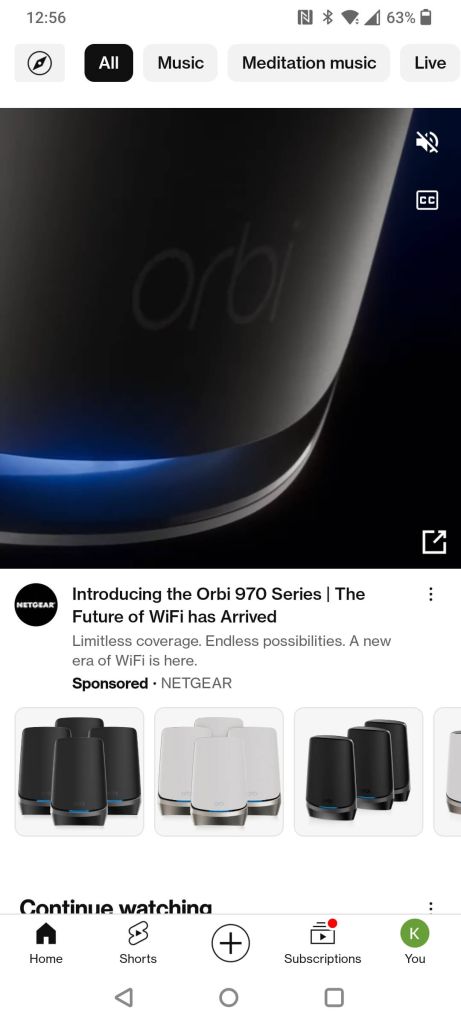
Discovery ads appear in places where people are most likely researching products or watching product reviews including the YouTube homepage for example. Google users can opt out of the data that’s tracked to put together targeted Discovery Ads, but most people don’t and Google claims it can reach up to 3 billion users. Google does this by tracking users:
A display ad is a type of online advertisement that displays images or videos that appear across millions of websites worldwide that are part of Google’s Display Network, e.g YouTube, appearing on third-party websites.
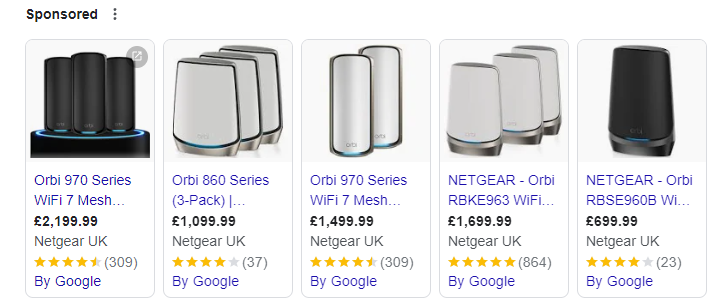
Shopping ads use your product catalogue to showcase e-commerce optimised ads across the Google Search and Display networks. Google’s automatic targeting shows what it thinks is the most relevant product for a user’s search Google shows product listings – both ads & organic results in an e-commerce inspired layout that’s easy to browse, click through, and buy. Example:
This article is part of our blog series, Websites 101, lightly introducing and explaining important topics on everything to do with websites, including design, digital marketing, software, infrastructure and beyond.
If you have a question you want answered as part of the Websites 101 blog series? Get in touch to let us know.
Discover how our team can help you on your journey.
Talk to us today