
You may have seen some noise online about Google making its “biggest update in 25 years.” That’s not clickbait. Something genuinely significant has happened, and if you’re running Google Ads, it’s worth understanding what’s changed and what to do about it.
Google has introduced something called AI Mode. Instead of returning a list of links when someone searches, Google now generates a conversational AI answer directly on the page. Think of it less like a search results page and more like asking a knowledgeable assistant a question.
This has two big consequences for advertisers:
Google has also launched a new product called AI Max, which sits alongside Performance Max and Demand Gen as part of what they’re now calling the “Power Pack.” AI Max supercharges existing Search campaigns with AI-driven targeting and a new “AI Brief” feature that lets you guide how your ads are presented, rather than specifying exact headlines.
The honest answer is that control is reducing. Google’s AI is taking more of the decisions that advertisers used to make manually. That’s uncomfortable, but it’s the direction of travel, and it is not reversing.
There’s also a new metric worth knowing about called Attributed Brand Searches (ABS). It shows how many people searched for your brand after seeing one of your ads. As the funnel gets messier and attribution becomes harder, this becomes a useful indicator of whether your advertising is building brand awareness.
Here’s where it gets more nuanced. The picture in the UK and EU is different from the US right now. AI Mode isn’t fully rolled out here yet, and ads within AI Mode are currently limited in European markets due to privacy regulations. That gives you some breathing room.
This doesn’t mean you should sit back and wait. It means you have a window to understand what’s coming, watch how it performs in the US, and make considered decisions rather than reactive ones.
Start the creative conversation. Google’s AI needs good-quality content to work with. Videos, images, strong website copy and well-structured landing pages are no longer nice-to-haves. They directly affect how your ads are assembled and where they appear. If your creative assets are thin, this is the time to address that.
Review your campaign mix. If you’re running lower-funnel Search-only, the new landscape will hit you harder than it will advertisers with a broader setup. It’s worth at least understanding where Performance Max or Demand Gen might fit in your account.
Don’t restructure in a panic. AI Max is still relatively new and the evidence on performance is still coming in. We’d recommend a test-and-learn approach before committing significant budget to new campaign types.
Keep an eye on your Search Impression Share. If it starts to fall without an obvious reason, AI Mode displacement is a likely culprit.
Google is moving fast, and the level of control advertisers have over Search campaigns is shrinking. That’s a genuine challenge. But the fundamentals haven’t changed: campaigns built on strong creative, clear audience understanding, and sensible structure will outperform those that aren’t, whatever the platform decides to do next.
If you want to talk through what this means for your specific campaigns, get in touch and we can take a proper look.
Any .uk domain name, including .co.uk, .org.uk etc, will be undergoing some alterations in the way they are created, managed, transferred and cancelled.
.uk’s are handled through a UK Government appointed body called Nominet. Infotex are proud to have been full members of Nominet for over 20 years, holding the IPS (Registrar) tag of INFOTEX. This allows us to directly and efficiently manage many of our clients domains, as well as contribute towards the policies and procedures that Nominet implement.
Over the last 4 years Nominet have been going through an evolution to modernise and standardise, learning from the last 30 years and looking to future-proof it for the next 30. Infotex staff members have attended various in-person and virtual meetings as part of Nominet’s consultancy period. Every domain extension operates slightly differently and has separate policies and pricing. This new process will ultimately result in .uk domains being managed in a manner much closer to how .com domains are currently managed.
A date of February 2027 has now been set for the launch of Nominet’s next generation platform for domain management, this will also bring with it a number of changes to the policies and practices as to how the domains are created, managed, transferred and ultimately surrendered although at present there are no plans to change the pricing of these.
Perhaps the most important change is that domain transfers will no longer operate using the tag based “push” method – where you request your current registrar to move the domain to another registrar. Instead, the domain will be unlocked by the existing registrar, and “pulled” into the new registrar’s account.
The rules around the quality of name and address data on domains will also be changing as part of a drive to ensure that all domains are accurately recorded and registrars, such as Infotex, will gain additional capabilities to update these addresses in ways previously only available by our clients directly contacting Nominet.
If you’re interested in the details, you can read more on the Nominet website and some details are still being worked out as part of this transition that will affect all .uk domain registrations. However, most Infotex customers will not notice any change as we will continue to manage your domains for you. The more observant amongst you may notice changes to what we require from you when updating, transferring or renewing your domain(s).
Infotex have long been users of Cloudflare, creators of a range of technologies to secure, optimise and speed up websites.
Connect on Tour London is their annual in-person showcase that details Cloudflare’s latest features and what’s on the roadmap. We sent Infrastructure Manager John Harman along to find out more.

Held at The Brewery in central London on 15 April, the event brought together (‘Connect’ed’) around 1,200 attendees to hear how rapidly things are changing, meaning that the Internet of yesterday isn’t the Internet of today, and will be very different to tomorrow’s.

The event highlighted the vast scale that modern CDNs work at with data centres in 335 cities across 125 countries, transiting over 7 trillion requests per day and over 500Tbps of bandwidth capacity – these are figures that it’s hard to get your head around. It also gives them a unique perspective on what is happening across the web both in terms of witnessing hundreds of billions of attacks per day and being able to identify good and bad actors amongst this fire hose of data, speed is at the centre of everything they do, that includes developing new protocols for the web and building out enterprise class AI models that can identifying the purpose of a visitor in milliseconds (compare this to the seconds, or minutes, that ChatGPT takes to respond).
For businesses trading in so many countries with different laws, the challenges that these pose were evident, and Cloudflare’s localisation and “edge compute” that runs developers’ code in the viewer’s country provide a compelling offering for compliance.
Naturally, a common theme at the event was the agentic web, over 50% of global traffic is now bots. Some of these, such as GoogleBot, are beneficial. Others are scrapers posing challenges to the revenue model of ad-funded content and news sites while posing opportunities for e-commerce stores. With bots always evolving, it is harder than ever to identify good from bad, but Cloudflare’s latest technology allows clearer identification of bot traffic which can then allow, rate limit or block as applicable.
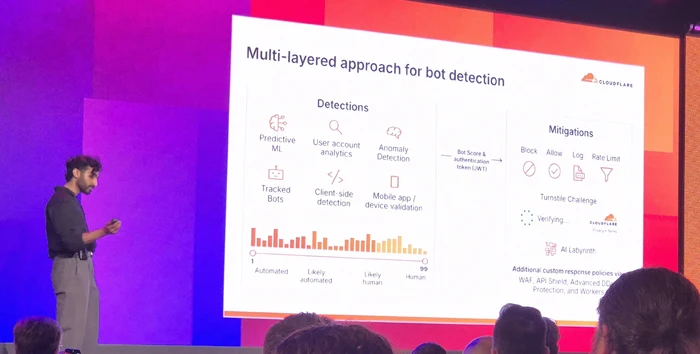
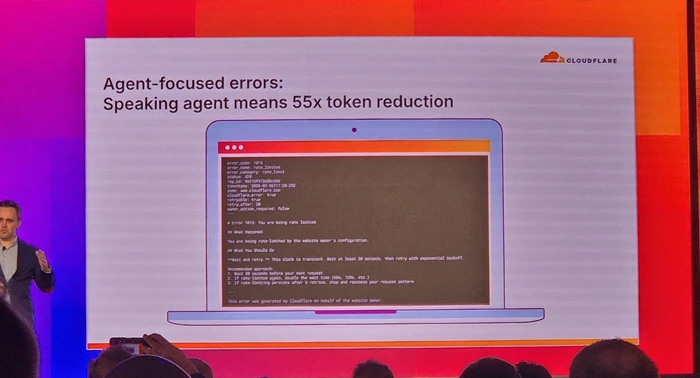
Cloudflare know they have to help AI training bots understand their clients sites as efficiently as possible, and during the day showed off features such as using AI to generate bot-ready versions of web pages on-the-fly to both reduce the tokens, and bandwidth, needed to consume the content and help their clients rank most highly.
Similarly, their tooling allows site owners to use AI to identify and control those training bots, they are even taking that a step further with means to charge the bots for access to valued content.
With the proliferation of AI MCP (Model Context Protocol) Cloudflare showed how their traditional WAF (Web Application Firewall) tools are being updated to provide protection for API and MCP endpoints to prevent malicious actors from attacking these and potentially breaking outside their intended boundaries (guardrails), effectively pitting good AI against bad AI.
At the other end of the spectrum, their enterprise clients are utilising Cloudflare’s AI models to compute responses on Cloudflare’s edge servers that are located close to the viewer for ultimate performance and in some industries regional compliance.
We also heard how AI has allowed lawyers processing data breaches of non-Cloudflare systems, to turn months of manual labour into a few days, allowing impacted parties to be notified in more timely ways than ever before.
When the web is moving at such pace with risks at every turn, it is great to see that there are good guys who’s mission is simple – “To help build a better Internet”.
We’ve had an increase in queries over the last few weeks from clients referencing various domain scams. These seem to go in cycles, with a different variant popping up every few years, but below are the common ones to be aware of.
This one has been around for years – I remember clients falling for domain slamming in the early 2000s. This scam consists of a deceptive registrar who attempts to get you to transfer your domain from your current provider to them, by a carefully worded (or outright lying) email. These may be official-looking invoices, pay now links, threats you’ll lose your domain name, etc. If you do transfer, you can expect inflated renewal fees and difficulty when you want to transfer away.
Perhaps not an outright scam, but certainly on the dubious side. Again, you receive an official-looking email that at first glance looks like a renewal notice with an invite to pay. However, on closer examination it is just for a notification service – so they’ll tell you when your domain is due to expire, but they can’t actually renew it for you.
Your current domain registrar should be sending you a renewal reminder anyway, so definitely a paid for service you don’t need.
This type of scam usually originates from a Chinese domain registry who email claiming someone is trying to buy domains with .cn / .com.cn / .hk / .tw extensions and they want to let you know as it conflicts with your company name or trademark. Oh, and would you like to buy them instead before they do do?
Ignore these. Never have I known them to register the domains they claim are under threat.
You receive an email from someone who wants to buy one of your domains. That can happen, but in the follow-up correspondence they want you to get the domain appraised through a specific company to validate the cost. And there’s the scam, once you’ve paid to have it appraised, you hear nothing more as the scammer is tied to the appraisal service..
As developers, we get as excited as you do about the new solution we’ve built for you, the website we’ve just deployed, or that extra piece of functionality that we’ve just released that saves time for everyone. However, we also know that a fundamentally important part of the lifetime of your solution is the process of keeping it up to date. No matter what technology stack we might have used to build your solution, we know that updates get released for that technology to address security vulnerabilities, reliability, or improve performance.
As part of our commitment to working with you throughout the lifetime of the solution we build, we will endeavour to keep your software secure and efficient by monitoring for updates to the technologies we’ve used during development.
For products built using Microsoft technologies, there are regular monthly updates as improvements are made and issues addressed. On top of that, Microsoft release a new version of the underlying .NET platform every year, usually in November and we’ll look to incorporate those new versions into your software wherever possible. Even if you do not want new features from the latest .NET version as each is supported for around 2-3 years, it is important to remain on the current version as that will bring you a lower total cost of ownership across its lifespan compared to waiting for a version to expire (think little and often).
For WordPress sites, we enrol all clients into our software update cycle by default with significant versions released approx 3-4 times per year to fix bugs, security issues and add new features as the platform evolves. We also deploy plugin updates which are released in a more ad-hoc fashion by their authors. This is on top of server maintenance such as an annual PHP (programming language) update and periodic database and server updates. This model helps to extend the lifespan of your investment and it’s not uncommon for a WordPress site to continue to evolve for 10+ years although the desire to use block-based designs has been a watershed moment for many.
For products built using the NextJS stack we again advocate routine quarterly updates. Much like .Net, NextJS provides a new major version every autumn that can require some refactoring of existing code to provide ongoing compatibility, in particular of any external modules which have been used (we always minimise the number of such modules during site construction for this reason). NextJS is often used in conjunction with its NextJS Server Components which are based on NodeJS to offer database and API functionality and this needs to be maintained for compatibility and security, typically NodeJS release a Long Term Support release each Spring which provides 2 years of support.
As part of our support service we’ll liaise with you to identify suitable timings to incorporate updates, addressing security vulnerabilities as early as possible to ensure you and your users can have a high level of confidence in the system you are using.
The digital landscape is shifting faster than ever. To ensure we can keep our clients ahead of the curve, Ant Agar and John Harman headed to the ExCeL London this month for Tech Show London 2026.
Joining 30,000 industry leaders and 450 exhibitors, the event mixes high-level strategy sessions with pioneers like Professor Hannah Fry and Baroness Martha Lane-Fox to technical deep dives with Formula 1 and the NCSC.
The trade stands were a fascinating mix with everything from established multinational data centre power and cooling technology providers (including our client Crane Fluid Systems) through to new start-ups offering services that took some mental gymnastics to even understand, and everything in between. Every visitor was left certain that the current buzzword was AI however.

One of our key purposes of the visit was to help us understand our place, opportunities and threats within the new and rapidly evolving AI-powered landscape that we find ourselves in and we came away both excited and somewhat reassured.
There can be no doubt that businesses and organisations of all shapes and sizes are daunted by the pace and scale of the AI induced change taking place globally. It is possible to enter a mindset of nervousness and uncertainty about what to do, as we all go about our daily lives.
Interestingly, even before the turbulence created by war in the Middle East, we have been seeing share prices surge back and forth in the stock markets, depending on the latest interpretation of what might lie ahead. A recent substack publication by Citrini Research is one such example of the jitters jittering around the globe.
But spending a little time at events like Tech Show London reminded me of the positivity and excitement at this next stage of our evolution. The scale of investment, in infrastructure, capacity, capability and creativity, was laid bare for all to see in stand after amazing stand of state of the art technology.
Attending talks on DevOps automation, national cyber resilience, and evolving working patterns working with AI, I was struck by how quickly the conversation has moved beyond “Chatbots.” The defining theme of 2026 is the rise of “Agentic AI”.
Unlike the generative tools of the past few years, which wait for a human prompt, Agentic AI is proactive. We are moving from a world where we use AI as a tool to one where we collaborate with AI as a teammate.
However, with this “autopilot” capability comes a new challenge – governance. A recurring theme at the show was the “Human-in-the-Loop” (HITL) model. As we delegate more tasks to autonomous agents, the role of leadership shifts from execution to oversight.
We must ensure these systems are ethical, transparent, and built to be secure and reliable. Innovation is gaining pace, but the most successful organisations will be those that pair this incredible technology with human intuition and strategic intent.
The “jitters” may remain in the global headlines, but on the ground in London, the energy was one of pure momentum. The technology to transform our professional and personal lives is being built to last. No longer a distant “maybe”, it is here and the potential for creativity and resilience is staggering.
At Infotex we are embracing this innovation, with a mix of projects ranging from data analysis through making websites work better to re-working how we develop and manage all of our technical inventory.

One of my key focuses was on understanding the impact of AI on security. It can help us to defend, for example with much more accurate identification of legitimate vs. malicious traffic. And it is also also posing threats, such as hyper-personalised AI-generated phishing emails that are hard to defend against. Some of the conversations during the day helped to demonstrate that what we’re seeing is not unique to us, and it’s powerful to realise that similar topics are being played out on national and even international stages, which means there is also a lot of help out there.
It also helped crystallise some existing thoughts as to our technical approach and added new areas for further investigation, indeed we will be following up with some of the potential, and existing suppliers, spoken to during the day.
Unlike some previous buzzwords that have been a central part of past shows, my takeaway is that AI is here for the long haul and set to become a part of how we all do business, buzzword or not.
Our team will be getting out and about at further events across the coming year and we look forward to sharing some of what we learn from these, so watch this space.
“Carding” is a specific type of payment fraud that we have seen impacting an increasing number of sites. It is a systematic approach used by attackers to determine which stolen credit card details are still active and valid.
The process begins when an attacker purchases a large set of stolen credit card details, typically from a site hack and often for a very low price, from a dark web marketplace.
Since a significant portion of these cards will already have been cancelled or blocked, the attacker needs a fast, automated way to validate them so they can be sold to other fraudsters at a higher value.
This validation process, known as carding, has 4 primary stages:
With the level of automation that these fraudsters have created, this whole process can be completed in a matter of hours or days.
Having thousands of failed transactions can impact your standing with your banking provider leading to them requiring additional technical controls, guarantees, costs or in extreme cases closure of your merchant account. Equally, accepting payments from cards that are used fraudulently and thus have the cardholder make a claim against those transactions can incur significant penalty costs from your bank.
On top of those risks, the administrative burden of receiving thousands of order confirmation or failure emails and then resolving the disputed transactions and influx of related support queries can quickly overwhelm your internal operations.
E-commerce businesses can implement several layers of defence to protect themselves from being used as a validation point for carding operations:
Since Carding relies heavily on automated scripts and bots, controlling this traffic on your payment pages is a primary defense:

Online security services can provide an effective first line of defense before the traffic even reaches the website’s server:

Working directly with the payment processor to tune fraud detection is critical:
As a web agency, we understand that maintaining a secure checkout is just as important as maintaining a beautiful one. Preventing carding is not just about stopping fraud; it’s about protecting your merchant reputation and ensuring your site remains a trusted place to shop. If you are concerned about suspicious transaction patterns or want to audit your current security before this becomes an issue, then please get in touch.
Over the years, I’ve spoken with many companies that have ran into serious problems because they didn’t know where their domain name was registered. These are usually panicked calls – yesterday everything was fine, and now suddenly they very much aren’t.
So, the issue gets traced back to the domain name, but no one knows where it is registered or who has access.
Domains outlive these short-term relationships, so take a few steps to make sure yours is safe before there is a problem.
Domains are renewed for a specified period of time of up to 10 years into the future. Just before that time is up, you will receive a notification from the registration provider to renew. You pay some more money. Rinse and repeat forever. You’re effectively renting a domain from a domain registry.
However, if the email address the renewal reminder goes to no longer works, or the notification is simply overlooked, it can lead to your domain name expiring. What happens next will vary depending on what type of domain it is – a .com may have different rules from a .co.uk, but the broad steps are similar.
For a .com/.net type of domain, on the day of expiry you can expect the services associated with the domain to stop working. Most notably, this is the nameservers that tell a browser where your website ‘is’ when you type it in the address bar, and where to direct emails to when someone sends to that domain. (Note: the domain and nameservers are completely independent of each other, and separate from your website and email. You could have all four services with completely different companies.)
For a .co.uk / .uk domain things are a little more lenient as there is a 30-day grace period before the services associated with the domain stop working.
At this point you haven’t lost your domain, yet. In either case, from the day that services are suspended you will have at least 30 days to renew. For .com/.net domains providers charge a penalty fee due to the domain being in the “redemption grace period”.
After that point the domain is set to be deleted. This can be between 5-7 days and it can’t be recovered or registered in that window. The domain is then “dropped” and is available for repurchase by anyone. “Drop-catchers” snap up such domains and attempt to sell them on at a premium fee or setup a holding page full of adverts to earn money from the domain’s remaining visitors.
Registrar: A company that manages the reservation of domain names.
Domains are renewed for a specified period of time. Just before that time is up, you will receive a notification to renew. You pay some more money. Rinse and repeat forever. You’re effectively renting a domain from a domain registry.
1. Confirm where your domain is registered
Do you know the domain registrar company by name? This could be 123-Reg, GoDaddy, IONOS, NameCheap or any one of scores of others.
To help find where it’s registered, you can lookup domain registration details using various tools. For .uk domain names, they operate under Nominet’s authority and I recommend using their lookup here: https://nominet.uk/lookup/ . Infotex have our own Nominet tag “INFOTEX”, making it easy to identify if we do hold your domain.
For other domains, go to https://lookup.icann.org/en/lookup and enter your domain name, select Lookup, and scroll down to the Registrar Information section. Hopefully, this rings a bell and you can go to step 2.
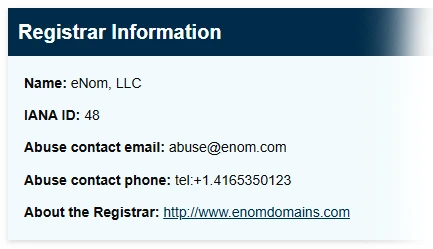
It is important to understand that the registrar you see isn’t always the original place you purchased the domain name from. For example, Infotex use eNom for some of our domains so it would show as them rather than Infotex. In this case, eNom provide a reseller lookup tool where you can check who to contact. Other registrars may not show this information. If you find your domain is with 123-Reg, for example, but have no logins you may need to go through a recovery process to gain access to the domain name. This can be a lengthy process but much easier to do now while things are working. It will require you to provide proof of identity as the owner of the domain, but check the registrar’s help pages for further info.
2. Test the login details
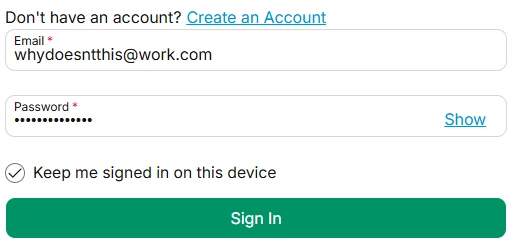
If you manage your domain directly with a registrar make sure you can actually sign in to your registrar’s domain control panel.
This isn’t necessary if you have registered with a 3rd party such as Infotex and are confident they are managing it for you. Some 3rd parties provide a domain management portal so you, as the owner, can log in and check or even take control if needed.
3. Check your contact details
This is two-fold. Firstly, your primary login details to your account should not use an email address which is dependent upon the same domain. i.e. if you are logging in to manage MyDomain.com, your login email should not be sales@MyDomain.com. If that domain has a problem then you may struggle to reset your password or receive the two-factor authentication code. Some providers support secondary email addresses for this reason. Be very careful with this, as alternate emails are very easy to lose if they are only used for one job. Definitely make sure it is not an employee’s personal email address.
Secondly, against each domain will be your contact information. Make sure that is up to date, and you should again consider whether to use a separate contact email to the domain it refers to.
4. Review who has access
I would recommend changing your password now to something strong, and making sure two-factor authentication is turned on, and recovery codes are safely stored. This will stop others who may have needed temporary access in the past from continuing to log in. It will also allow you to closely monitor who has access in the future.
5. Check renewal & lock settings
Is auto-renewal enabled for your domain? Auto-renew is useful up until the payment method expires, but turning it off can be a useful prompt to a) check your logins and payment details ahead of renewal and b) make sure you still want the domain.
Also check that ‘domain lock’ is enabled. For most .com’s this will be on by default. Enabling it is a belt-and-braces prevention of someone transferring your domain out of your account. There would be multiple authentication steps to transfer a domain, such as an email to your admin contact, but while this is enabled a domain can’t be transferred.
That may well be true. and in many cases it’s perfectly fine for someone else to manage domains on your behalf, we have thousands of them under our control after all. But, the key point is still visibility.
Even if someone else manages it on your behalf, you should still:
This year’s Infotex Christmas Gathering marked my first full year working at Infotex. Before this, I spent a long stretch freelancing and then working in partnership with one other person. Back then, our Christmas tradition usually involved a meal and a London show as a way to celebrate wrapping up the year, rather than a big team get-together.
So stepping into my first proper company Christmas gathering felt like a real milestone and it made me reflect on how much I’ve enjoyed being part of a team again.
One of the things I’ve loved most about working at Infotex is the feeling of working together, solving problems together, and building things that are bigger than what any one of us could take on alone. I’ve had the chance to use a mix of skills across web development, UX/UI design and UX audits, and it’s been great doing that as part of a wider group.

We have four gatherings a year, and I’ve come to look forward to them. They’re a chance to work face-to-face on current projects, but also to talk strategy. Where we’re heading, what we’re improving, how we want to grow as a business.

It’s easy to forget how much you miss seeing people in person at work until you actually do. You get to know people better, and it’s just easier to talk things through properly.

This year’s Christmas gathering took place in a house in the Suffolk countryside, which was cosy and nicely away from the usual routine. After the work part of the day, it was time for Secret Santa.

I received a large box of Ferrero Rocher, which was a win as chocolate is always welcome!
Meanwhile, Matt became convinced that I got him his Cambridge United calendar and mug. He will never know for sure… and I’m not telling. Some Christmas mysteries are worth keeping.
No Infotex Christmas gathering would be complete without the annual Christmas quiz, run by Kris Parker. We also had a gingerbread train-making competition, which… did not go well for my team. We ended up with a pile of gingerbread rubble!
After the games, we headed to the dining room for a wonderful three-course Christmas dinner. It was great to have the whole event in one place as it felt relaxed and unrushed.
So, here’s to my first Infotex Christmas gathering – and to many more!


It’s that time of year again : the John Lewis ad is out, the Coca-Cola truck is delivering fizzy pop, people are wondering if a tub of Celebrations has gotten smaller and the Infotex Christmas Quiz is unleashed.

As it’s the 200-year anniversary of the railway, there was a dedicated train round amongst a mix of questions about the events of 2025. But don’t let that turn you off – grab your Oyster card, mind the gap and all aboard:
For those taking part in person, they also had to assemble and decorate a gingerbread train under a strict time pressure and sans instructions.




Infotex have been audited as Cyber Essentials Plus compliant to the latest 2025 standard.
We have undergone these independent audits for each of the last 4 years to validate that we are applying best practices for cyber security to help keep ourselves – and our clients – safe against the rising threat of data breach and ransomware.
Many of our clients place a great deal of trust in us. We appreciate the responsibility of this trust and want to reassure all our clients that we are looking after their data safely. Going through a detailed audit like this helps us to ensure that we are doing all that we can.
With the Internet and IT in general being a constantly evolving space, it is important to not rest on past accolades. By utilising external consultants there are always new things to learn and improvements to that can be made. The Internet can be a scary place and worldwide companies are being breached, hacked and ransomed on a daily basis. However, data shows that having controls in place increases the resistance to attack by around 90%.
Cyber Essentials is a scheme overseen by the UK Government’s National Cyber Security Centre (NCSC) and backed by the Federation of Small Businesses (FSB) and Confederation of British Industry (CBI). Within this framework, there are two levels of compliance : Cyber Essentials and Cyber Essentials Plus.
To be compliant with the base Cyber Essentials, an organisation must answer around 70 questions providing technical information and policies for evaluation. These questions cover a wide spectrum, from password policies and storage through to individual computer configuration, networking, software choices and maintenance, and also includes HR policies. It is designed to ensure that the applicant has to evaluate whether they are following current best practice rather than following outdated guidance or beliefs.
Cyber Essentials Plus takes this to the next level. An independent auditor spot-checks a sample number of devices (PC’s and servers) and interview staff members of their choosing to ensure that the policies and practices are being followed across the business. The auditors also perform a range of technical tests to ensure appropriate segregation and security are in place.
Out of an estimated 5 million UK businesses, only around 50,000 successfully complete Cyber Essentials audits each year. There is still a long way for the country as a whole to go to increase its cyber security and is likely to be part of the reason why the Government are bringing forward the UK Cyber Resilience Bill. This will formalise requirements for entities which are in scope, and many of these requirement are based on the underlying pillars of Cyber Essentials.
In recent years we have worked to a limited scope meaning that, from a Cyber Essentials auditing perspective, there were elements of our business which were not able to be fully evaluated. We have been working hard over the last few years to ensure that we have full visibility and follow best practice consistently across the whole business. We have also completed the purchase of additional software to help us monitor all our devices and ensure that we are applying these standards consistently across all our platforms. We are therefore pleased that for 2025 we have been awarded the certification for the whole of Infotex UK Ltd.
2025 also saw a new set of evaluation criteria called “Willow” for the assessment which tightened some controls and in turn required some minor changes to our configurations, however, pleasingly, the majority of the specification changes were to elements where we already exceeded the requirements.
Anyone who works within IT knows how tough it is to be secure because the defender has to be effectively perfect at all times, whereas the attacker only has to find one weakness to be able to get access.
This is why we talk consistently about security, both internally and externally, as we know that it really matters to our clients and there need to be more conversations around what people are doing to protect themselves. With phishing and other scams on the rise, by increasing your own security you are also helping to protect the security of the friends, family, colleagues and businesses around you.
We’re still often asked what makes a good password and why a lengthy string of random letters, numbers and symbols is the best. However, a prominent US body has recently altered its recommendations, which may perhaps make creating passwords slightly easier.
The National Institute of Standards and Technology (NIST) is a US government agency that provide the guidance that other US government agencies rely on. Because of this lofty position, when they make recommendations, it is generally recognised worldwide.
Back in 2016, NIST released their previous guidance on passwords which has been the basis for many agencies and businesses password policies. However, following four years of work, they have released new guidelines for password creation.
Previous guidelines recommended forcing employees to change their password every 45 days, and make sure those passwords include numbers, capital letters and special characters, causing them to be virtually immemorable.

There are some interesting insights here; complexity requirements are officially “out”. Surprisingly, forcing complexity onto humans actually weakens security by making passwords more predictable – think of logins such as “Password1!”. When users must add special characters they often follow common patterns that make it easier for attackers to guess. Of course, if you are using a password generator this shouldn’t be a problem.
From a computer science perspective this makes a lot of sense – the longer a password, the more attempts, and thus time, that any brute-force attack must go through in order to crack the password.
In a simple example, a 6-character password made just from letters could be brute-forced in around 321 million guesses. That may sound a lot but at modern compute speeds is very do-able and remember that most times the attacker will get lucky before they guess the final possible permutation. If you double the length of that password without adding any complexity you are not just doubling the time it would take an attacker, in fact the time goes up exponentially to around 99 quadrillion guesses.
Hive Systems created this chart, logging the time taken to hack a password of different lengths and complexity.
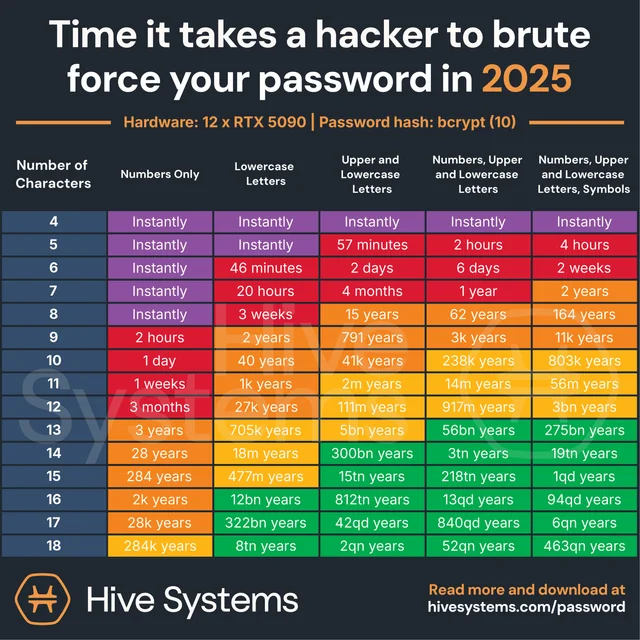
Any password generator will compute a suitable length password. In cases where a password generator isn’t feasible simply create a lengthy phrase – “MyCatIsAliceMyDogIsBob” is counter-intuitively strong because of its length and most attackers wouldn’t know exactly what the phrase was (at the time of writing it’s also never knowingly been in a breach).
There are a number of services which offer to check if a password is known to be in attackers’ lists (called dictionaries) and thus will be tested regularly, Have I been Pwned, supported by Cloudflare, allows you to check if the password you chose is known to attackers.
You can also enter your email address into https://haveibeenpwned.com/ to see if any of your accounts have been exposed in previous breaches and sign up for notifications going forward.
While passwords and passphrases are not going away any time soon, the world is starting to look beyond them and the challenges that they face security-wise.
The use of 2 factor authentication, especially when coupled with a code sent via an alternate means which expires after a period of time, really increases the complexity for an attacker to breach your accounts.
Passwordless logins such as PassKeys are now starting to become mainstream, you may have noticed when logging into Amazon on a modern mobile device that you will now be prompted to create a passwordless login, these work entirely differently by creating a challenge that the device uses to compute an asymmetric cryptographic response where the private component is stored on your PC/phone and the website only ever knows the public component. This allows the PC or device, once confirmed by means of a fingerprint or PIN, or similar, to generate a response that could only have been generated by that device.
As this is quite resistant to phishing, re-use and brute force attack, these make an exceptionally strong login means but currently have portability limitations (i.e. your phone and PC may not be able to share the same login unless they are from the same provider, e.g. Apple) however there are specifications being agreed that will allow greater interoperability going forward.
Physical tokens such as the YubiKey which can take a fingerprint and generate a unique output that cannot be replicated without physical access to the key and fingerprint are also a technology to watch as features such as NFC make what was once a very inconvenient and expensive way to authenticate, much easier and more affordable.
Discover how our team can help you on your journey.
Talk to us today