
Any .uk domain name, including .co.uk, .org.uk etc, will be undergoing some alterations in the way they are created, managed, transferred and cancelled.
.uk’s are handled through a UK Government appointed body called Nominet. Infotex are proud to have been full members of Nominet for over 20 years, holding the IPS (Registrar) tag of INFOTEX. This allows us to directly and efficiently manage many of our clients domains, as well as contribute towards the policies and procedures that Nominet implement.
Over the last 4 years Nominet have been going through an evolution to modernise and standardise, learning from the last 30 years and looking to future-proof it for the next 30. Infotex staff members have attended various in-person and virtual meetings as part of Nominet’s consultancy period. Every domain extension operates slightly differently and has separate policies and pricing. This new process will ultimately result in .uk domains being managed in a manner much closer to how .com domains are currently managed.
A date of February 2027 has now been set for the launch of Nominet’s next generation platform for domain management, this will also bring with it a number of changes to the policies and practices as to how the domains are created, managed, transferred and ultimately surrendered although at present there are no plans to change the pricing of these.
Perhaps the most important change is that domain transfers will no longer operate using the tag based “push” method – where you request your current registrar to move the domain to another registrar. Instead, the domain will be unlocked by the existing registrar, and “pulled” into the new registrar’s account.
The rules around the quality of name and address data on domains will also be changing as part of a drive to ensure that all domains are accurately recorded and registrars, such as Infotex, will gain additional capabilities to update these addresses in ways previously only available by our clients directly contacting Nominet.
If you’re interested in the details, you can read more on the Nominet website and some details are still being worked out as part of this transition that will affect all .uk domain registrations. However, most Infotex customers will not notice any change as we will continue to manage your domains for you. The more observant amongst you may notice changes to what we require from you when updating, transferring or renewing your domain(s).
Infotex have long been users of Cloudflare, creators of a range of technologies to secure, optimise and speed up websites.
Connect on Tour London is their annual in-person showcase that details Cloudflare’s latest features and what’s on the roadmap. We sent Infrastructure Manager John Harman along to find out more.

Held at The Brewery in central London on 15 April, the event brought together (‘Connect’ed’) around 1,200 attendees to hear how rapidly things are changing, meaning that the Internet of yesterday isn’t the Internet of today, and will be very different to tomorrow’s.
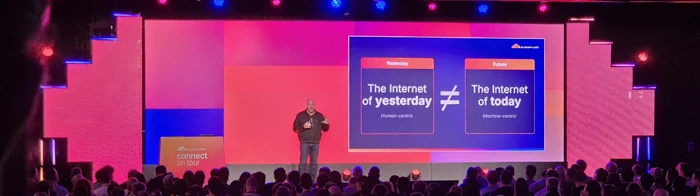
The event highlighted the vast scale that modern CDNs work at with data centres in 335 cities across 125 countries, transiting over 7 trillion requests per day and over 500Tbps of bandwidth capacity – these are figures that it’s hard to get your head around. It also gives them a unique perspective on what is happening across the web both in terms of witnessing hundreds of billions of attacks per day and being able to identify good and bad actors amongst this fire hose of data, speed is at the centre of everything they do, that includes developing new protocols for the web and building out enterprise class AI models that can identifying the purpose of a visitor in milliseconds (compare this to the seconds, or minutes, that ChatGPT takes to respond).
For businesses trading in so many countries with different laws, the challenges that these pose were evident, and Cloudflare’s localisation and “edge compute” that runs developers’ code in the viewer’s country provide a compelling offering for compliance.
Naturally, a common theme at the event was the agentic web, over 50% of global traffic is now bots. Some of these, such as GoogleBot, are beneficial. Others are scrapers posing challenges to the revenue model of ad-funded content and news sites while posing opportunities for e-commerce stores. With bots always evolving, it is harder than ever to identify good from bad, but Cloudflare’s latest technology allows clearer identification of bot traffic which can then allow, rate limit or block as applicable.
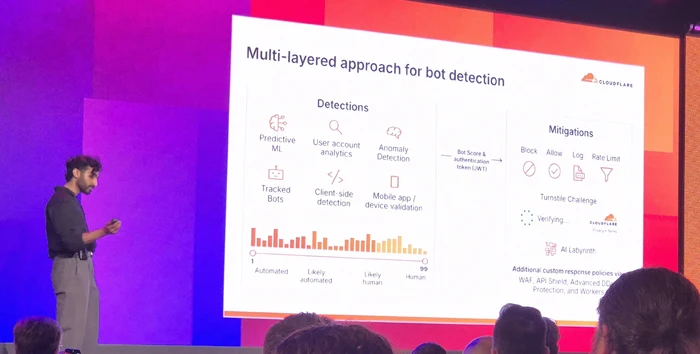
Cloudflare know they have to help AI training bots understand their clients sites as efficiently as possible, and during the day showed off features such as using AI to generate bot-ready versions of web pages on-the-fly to both reduce the tokens, and bandwidth, needed to consume the content and help their clients rank most highly.
Similarly, their tooling allows site owners to use AI to identify and control those training bots, they are even taking that a step further with means to charge the bots for access to valued content.
With the proliferation of AI MCP (Model Context Protocol) Cloudflare showed how their traditional WAF (Web Application Firewall) tools are being updated to provide protection for API and MCP endpoints to prevent malicious actors from attacking these and potentially breaking outside their intended boundaries (guardrails), effectively pitting good AI against bad AI.
At the other end of the spectrum, their enterprise clients are utilising Cloudflare’s AI models to compute responses on Cloudflare’s edge servers that are located close to the viewer for ultimate performance and in some industries regional compliance.
We also heard how AI has allowed lawyers processing data breaches of non-Cloudflare systems, to turn months of manual labour into a few days, allowing impacted parties to be notified in more timely ways than ever before.
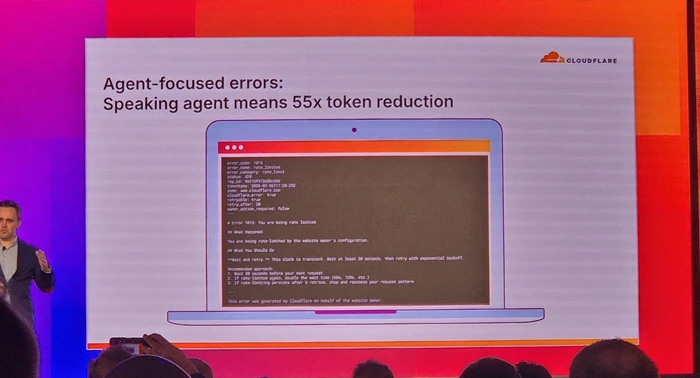
When the web is moving at such pace with risks at every turn, it is great to see that there are good guys who’s mission is simple – “To help build a better Internet”.
Over the years, I’ve spoken with many companies that have ran into serious problems because they didn’t know where their domain name was registered. These are usually panicked calls – yesterday everything was fine, and now suddenly they very much aren’t.
So, the issue gets traced back to the domain name, but no one knows where it is registered or who has access.
Domains outlive these short-term relationships, so take a few steps to make sure yours is safe before there is a problem.
Domains are renewed for a specified period of time of up to 10 years into the future. Just before that time is up, you will receive a notification from the registration provider to renew. You pay some more money. Rinse and repeat forever. You’re effectively renting a domain from a domain registry.
However, if the email address the renewal reminder goes to no longer works, or the notification is simply overlooked, it can lead to your domain name expiring. What happens next will vary depending on what type of domain it is – a .com may have different rules from a .co.uk, but the broad steps are similar.
For a .com/.net type of domain, on the day of expiry you can expect the services associated with the domain to stop working. Most notably, this is the nameservers that tell a browser where your website ‘is’ when you type it in the address bar, and where to direct emails to when someone sends to that domain. (Note: the domain and nameservers are completely independent of each other, and separate from your website and email. You could have all four services with completely different companies.)
For a .co.uk / .uk domain things are a little more lenient as there is a 30-day grace period before the services associated with the domain stop working.
At this point you haven’t lost your domain, yet. In either case, from the day that services are suspended you will have at least 30 days to renew. For .com/.net domains providers charge a penalty fee due to the domain being in the “redemption grace period”.
After that point the domain is set to be deleted. This can be between 5-7 days and it can’t be recovered or registered in that window. The domain is then “dropped” and is available for repurchase by anyone. “Drop-catchers” snap up such domains and attempt to sell them on at a premium fee or setup a holding page full of adverts to earn money from the domain’s remaining visitors.
Registrar: A company that manages the reservation of domain names.
Domains are renewed for a specified period of time. Just before that time is up, you will receive a notification to renew. You pay some more money. Rinse and repeat forever. You’re effectively renting a domain from a domain registry.
1. Confirm where your domain is registered
Do you know the domain registrar company by name? This could be 123-Reg, GoDaddy, IONOS, NameCheap or any one of scores of others.
To help find where it’s registered, you can lookup domain registration details using various tools. For .uk domain names, they operate under Nominet’s authority and I recommend using their lookup here: https://nominet.uk/lookup/ . Infotex have our own Nominet tag “INFOTEX”, making it easy to identify if we do hold your domain.
For other domains, go to https://lookup.icann.org/en/lookup and enter your domain name, select Lookup, and scroll down to the Registrar Information section. Hopefully, this rings a bell and you can go to step 2.
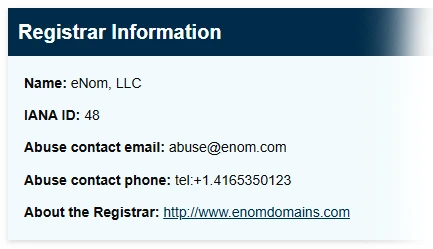
It is important to understand that the registrar you see isn’t always the original place you purchased the domain name from. For example, Infotex use eNom for some of our domains so it would show as them rather than Infotex. In this case, eNom provide a reseller lookup tool where you can check who to contact. Other registrars may not show this information. If you find your domain is with 123-Reg, for example, but have no logins you may need to go through a recovery process to gain access to the domain name. This can be a lengthy process but much easier to do now while things are working. It will require you to provide proof of identity as the owner of the domain, but check the registrar’s help pages for further info.
2. Test the login details
If you manage your domain directly with a registrar make sure you can actually sign in to your registrar’s domain control panel.
This isn’t necessary if you have registered with a 3rd party such as Infotex and are confident they are managing it for you. Some 3rd parties provide a domain management portal so you, as the owner, can log in and check or even take control if needed.
3. Check your contact details
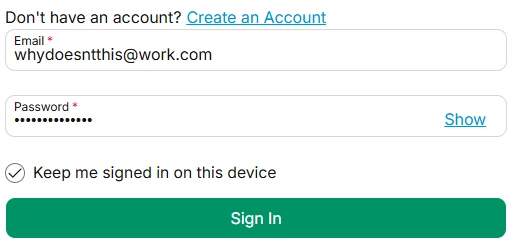
This is two-fold. Firstly, your primary login details to your account should not use an email address which is dependent upon the same domain. i.e. if you are logging in to manage MyDomain.com, your login email should not be sales@MyDomain.com. If that domain has a problem then you may struggle to reset your password or receive the two-factor authentication code. Some providers support secondary email addresses for this reason. Be very careful with this, as alternate emails are very easy to lose if they are only used for one job. Definitely make sure it is not an employee’s personal email address.
Secondly, against each domain will be your contact information. Make sure that is up to date, and you should again consider whether to use a separate contact email to the domain it refers to.
4. Review who has access
I would recommend changing your password now to something strong, and making sure two-factor authentication is turned on, and recovery codes are safely stored. This will stop others who may have needed temporary access in the past from continuing to log in. It will also allow you to closely monitor who has access in the future.
5. Check renewal & lock settings
Is auto-renewal enabled for your domain? Auto-renew is useful up until the payment method expires, but turning it off can be a useful prompt to a) check your logins and payment details ahead of renewal and b) make sure you still want the domain.
Also check that ‘domain lock’ is enabled. For most .com’s this will be on by default. Enabling it is a belt-and-braces prevention of someone transferring your domain out of your account. There would be multiple authentication steps to transfer a domain, such as an email to your admin contact, but while this is enabled a domain can’t be transferred.
That may well be true. and in many cases it’s perfectly fine for someone else to manage domains on your behalf, we have thousands of them under our control after all. But, the key point is still visibility.
Even if someone else manages it on your behalf, you should still:
We’re still often asked what makes a good password and why a lengthy string of random letters, numbers and symbols is the best. However, a prominent US body has recently altered its recommendations, which may perhaps make creating passwords slightly easier.
The National Institute of Standards and Technology (NIST) is a US government agency that provide the guidance that other US government agencies rely on. Because of this lofty position, when they make recommendations, it is generally recognised worldwide.
Back in 2016, NIST released their previous guidance on passwords which has been the basis for many agencies and businesses password policies. However, following four years of work, they have released new guidelines for password creation.
Previous guidelines recommended forcing employees to change their password every 45 days, and make sure those passwords include numbers, capital letters and special characters, causing them to be virtually immemorable.
There are some interesting insights here; complexity requirements are officially “out”. Surprisingly, forcing complexity onto humans actually weakens security by making passwords more predictable – think of logins such as “Password1!”. When users must add special characters they often follow common patterns that make it easier for attackers to guess. Of course, if you are using a password generator this shouldn’t be a problem.
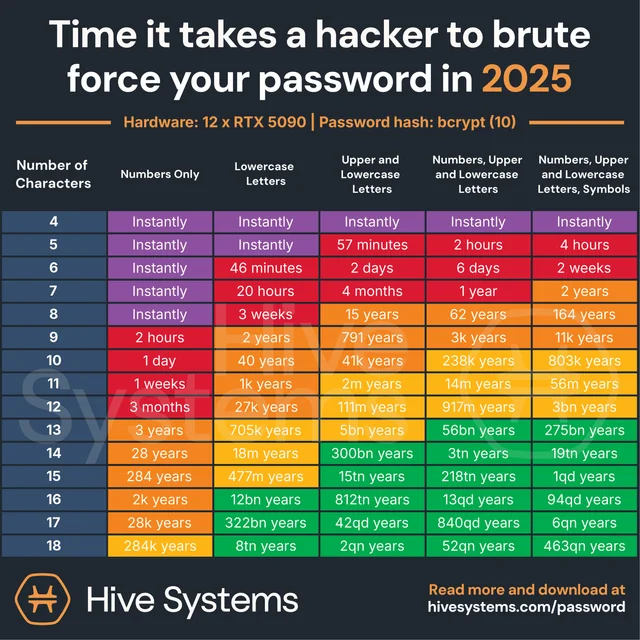
From a computer science perspective this makes a lot of sense – the longer a password, the more attempts, and thus time, that any brute-force attack must go through in order to crack the password.
In a simple example, a 6-character password made just from letters could be brute-forced in around 321 million guesses. That may sound a lot but at modern compute speeds is very do-able and remember that most times the attacker will get lucky before they guess the final possible permutation. If you double the length of that password without adding any complexity you are not just doubling the time it would take an attacker, in fact the time goes up exponentially to around 99 quadrillion guesses.
Hive Systems created this chart, logging the time taken to hack a password of different lengths and complexity.
Any password generator will compute a suitable length password. In cases where a password generator isn’t feasible simply create a lengthy phrase – “MyCatIsAliceMyDogIsBob” is counter-intuitively strong because of its length and most attackers wouldn’t know exactly what the phrase was (at the time of writing it’s also never knowingly been in a breach).
There are a number of services which offer to check if a password is known to be in attackers’ lists (called dictionaries) and thus will be tested regularly, Have I been Pwned, supported by Cloudflare, allows you to check if the password you chose is known to attackers.
You can also enter your email address into https://haveibeenpwned.com/ to see if any of your accounts have been exposed in previous breaches and sign up for notifications going forward.
While passwords and passphrases are not going away any time soon, the world is starting to look beyond them and the challenges that they face security-wise.
The use of 2 factor authentication, especially when coupled with a code sent via an alternate means which expires after a period of time, really increases the complexity for an attacker to breach your accounts.
Passwordless logins such as PassKeys are now starting to become mainstream, you may have noticed when logging into Amazon on a modern mobile device that you will now be prompted to create a passwordless login, these work entirely differently by creating a challenge that the device uses to compute an asymmetric cryptographic response where the private component is stored on your PC/phone and the website only ever knows the public component. This allows the PC or device, once confirmed by means of a fingerprint or PIN, or similar, to generate a response that could only have been generated by that device.
As this is quite resistant to phishing, re-use and brute force attack, these make an exceptionally strong login means but currently have portability limitations (i.e. your phone and PC may not be able to share the same login unless they are from the same provider, e.g. Apple) however there are specifications being agreed that will allow greater interoperability going forward.
Physical tokens such as the YubiKey which can take a fingerprint and generate a unique output that cannot be replicated without physical access to the key and fingerprint are also a technology to watch as features such as NFC make what was once a very inconvenient and expensive way to authenticate, much easier and more affordable.
If you’re having a problem with your website or system, our goal is to understand your issue as quickly as possible so we can get straight to resolving it.
The clearer and more detailed your support request, the quicker we can identify exactly what is happening and provide you with the right solution.
Without enough information, we may need to come back to you with follow-up questions, which can slow things down. By including just a few key pieces of information in your request, you can help us respond faster and more accurately.
Here’s a simple guide to making sure your support requests get the best possible results.
Here are four simple things you can include that make a huge difference in how quickly and efficiently we can help you:

If the issue happens on a particular page or section of your site, sending us the direct page address helps us see exactly what you’re referring to.
Example:
Instead of: “Our form isn’t working,”
you could say, “The contact form on https://www.example.com/contact isn’t sending submissions.”

“A picture paints a thousand words” – and that is especially true when explaining a technical problem.
A screenshot can instantly show us what you’re seeing and a short screen recording is even better if you want to demonstrate how the issue happens.
Whenever possible, use built-in screenshot or screen recording tools rather than taking a photo of your screen with your phone – phone photos are often blurry or hard to read, which can make diagnosing the problem more difficult.
Once done, attach the file or share the link with your support request.

A clear description of what you did before the issue occurred helps us replicate it and understand exactly what’s happening.
Sometimes an issue only happens under specific conditions, such as on a certain phone, browser, or operating system version. By telling us what device and browser you were using, we can test in the same environment and makes it much easier to track down the problem, especially if it doesn’t appear everywhere.

Sometimes, what’s “broken” isn’t necessarily a technical error, it might just be that the feature isn’t working the way you expected because it wasn’t designed that way.
That’s why it’s really helpful for us to know what you expected to happen and how you’d like things to work. When you tell us your goals, we can make sure the system matches your needs – whether that means fixing an issue, adjusting how something functions, or suggesting a better way to achieve the results you want.
The next time you reach out for support, think of these steps as a way to help us help you.
Every website needs a little love and care, is yours getting all it needs to help it truly flourish?
What does a care package mean in respect of a website? We see this as having 4 key areas:
Every business and website is unique. While the person, team, or agency that originally designed your site may have done a great job, their expertise could well be focused just on the design. However, maintaining and managing a website over time requires a different skill set – one they may not possess – making them less suited for ongoing support and care.
Just like your business evolves, so should your brand’s online presence. While a wholesale change is sometimes needed, more often than not small tweaks can ensure that you’re reflecting the values and practices of your wider business. These naturally evolve over time along with the markets they serve, just as you get a painter to give your buildings a touch-up periodically, your website should do the same.
The latest generation of automated tools can allow you to analyse the content on your website and ensure that it is on-brand and current in ways that a few years ago would not be cost-effective. Don’t just rely on tooling however, as branding can be intensely personal which is where a skilled and experienced design and copywriting team can help out.
If you are currently managing your site yourself, are you confident that you’re on top of the latest security updates needed for your site? When applying those updates, how do you check that you’ve not broken other vital parts of the site?
The time between a security issue being identified and attackers taking advantage of it is reducing. You need to ensure that relevant patches are being applied in a timely manner.
Security is a big picture and so much more than just applying patches. It has to be holistic, taking in every part of the ecosystem from password choices to server configuration and filtering out malicious requests. There are so many ways that someone, or an automated bot, can attack your website and the Internet will take advantage of any weakness you leave.
Navigating the world of online compliance can feel like a whole new language! Do you even know if your site complies with privacy requirements such as GDPR & PECR (Privacy & Electronic Communications Regulations) or accessibility rules such as WCAG (Web Content Accessibility Guidelines). We speak this language fluently and can provide actionable insights in plain English.

Using marketing platforms? You might need to implement and maintain compliance with systems like Microsoft UET (Universal Event Tracking) or Google’s CMP (Consent Management Platform), which are constantly being updated. Staying compliant with marketing platform requirements, like these is essential for data collection, ad performance, and avoiding legal penalties. Continuous monitoring of policy and technical updates is necessary in addition to constantly evolving your choice of where to place your ads and the audiences to target.
Is your website lightning-fast, especially on mobile? The average load time for a website on a phone is around 9 seconds compared to the 2 seconds average on desktop. There are a number of techniques that can be used to optimise performance for all platforms.
Caching and CDNs (Content Delivery Networks) ensure that the load time is consistently fast for your growing global audience.
Beyond speed, using metrics such as Google’s Core Web Vitals can help to benchmark your visitors’ experience, this is doubly important as these are also used by Google to help rank sites.
Think about making your website do more. On mobile a website can increasingly act as a fully functioning application. Have you considered whether you could use this to help streamline your customer support needs for example?
We’ve been in this business for over 25 years and we pride ourselves on providing long-term stable relationships with our clients. Perhaps the greatest testament to this is the volume of clients who have been with us for 10 years or more. Our continued success is based purely on our client’s success.
Building a new website is an expensive and sometimes risky process. We work with you to identify what’s working and what’s not, ensuring you get the most value from your initial investment.
We are all about creating an effective partnership with our clients and, to this end, every agreement has an ongoing care package. That may be as simple as providing the routine security patches for your content management system, or a more comprehensive package including marketing and development retainers. This principle is true regardless of your chosen technical platform.
We’re also the secret weapon for some of the smartest design and marketing agencies! Some amazing designers and marketeers understand that their focus should be on creating a great, high performing, site. They need a safe pair of hands to whom they can entrust the ongoing work, someone to keep their client happy once the site is live. This allows them to focus on their next design or marketing project.
We can work silently in the background or connect directly with the end client. If required, our experienced designers can add that extra polish to make even the most effective websites truly shine.
Well that all depends but it all begins with a conversation. Let’s discuss your goals and we’ll follow up with an audit to identify the areas needing most attention. Together we’ll create a plan to evolve your website and ensure it continues to be a valuable asset for your business going forward.
We talk about security a lot in the articles, but we talk about it even more internally as it’s vital we maintain safe and secure sites for our clients.
The threat intelligence team at WordPress security experts Wordfence have recently released their annual report on the state of WordPress’ security. As hosts of many WordPress sites we have to understand the ever changing landscape in which these sites exist so we can combat likely intrusion points..
The key take-aways from this year’s report were:
That sounds bad – more vulnerabilities means more problems? Not quite. There has been an increase in companies who are CVE Numbering Authorities. CVE stands for “common vulnerabilities and exposures”, and is a publicly available catalogue of known security flaws. Historically many WordPress issues were not reported but because of the increase in the number and openness of these authorities, it’s made it much simpler for people to officially disclose security problems.

As WordPress, and the majority of its plugins, are built within the open source ecosystem, anyone can download the code and analyse it. The more people who are looking, the more issues the more are likely to be found. Finding and reporting such issues is increasingly becoming a full-time (paid) occupation for many developers who are then paid through the “bug bounty” programs. These ensure that the bugs don’t end up in the hands of malicious entities therefore these being responsibility reported helps everyone within the ecosystem.
Out of the vulnerabilities reported the most common issue was Cross-Site Scripting (XSS), with over 1,100 reports in 2022 alone this accounted for nearly half of all vulnerabilities disclosed. Cross-Site Scripting attacks are a type of injection, in which malicious scripts are injected into otherwise benign and trusted websites. More than a third of the XSS issues required administrative permissions on the website itself in order to be successful, so the risk was greatly reduced. This does highlight why users should only be provided with the minimum level of access they absolutely need, WordPress has a strong permissions architecture with varying roles with Contributor, Author, Editor, Shop Manager and Administrator being the most common each with different abilities.
Despite the number of reported XSS vulnerabilities there were around 3 times as many SQL injection attacks as there were XSS. A SQL injection attack is when an attacker tries to run database commands through a website which has not taken care to sanitise what people are entering into forms etc. There was also a comparable number of malicious file upload or inclusion attacks, these might be where someone gains access to the administration area and uploads a script to gain them further access rather than the intended image or text.
There are more and more leaked password lists available online as more data breaches occur. Credential stuffing is where hackers are utilising usernames and passwords taken from these lists to try and log in to the admin area of your site. When directories like HaveIBeenPwned (enter your email to see what leaks your info has been a part of) over 12 billion compromised sets of credentials it is no wonder that Wordfence collectively blocked over 159 billion login attempts in 2022. Surprisingly, this is actually a slight decrease on 2021.
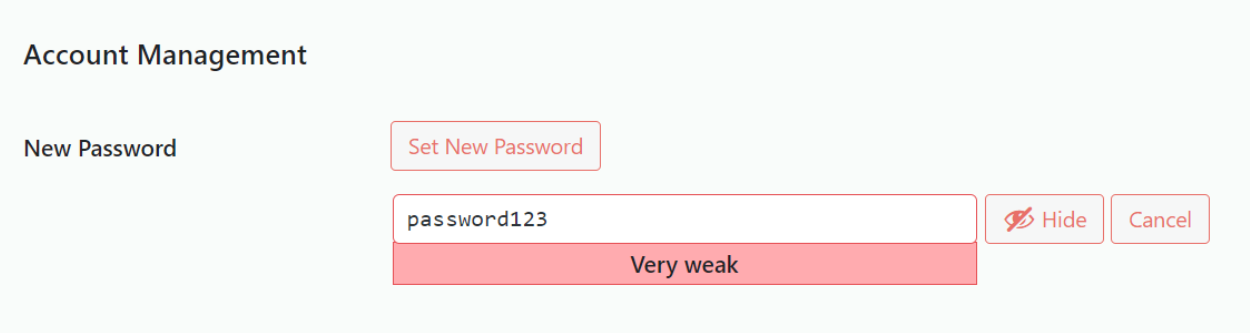
To keep your site safe please don’t use your WordPress login details on any other site, and make sure that when you create the password it is rated as Strong. These are good principals to apply to any site, and combining it with multi-factor authentication wherever it’s available will make it even more secure.
It has always been important to make sure that the core WordPress code, its plugins, and themes are kept up to date with the latest patches and it is no less true now. It’s obviously good practice for keeping your site secure, but also for extending its overall lifespan. Trying to upgrade very out of date plugins or WordPress code is very time consuming.
WordFence saw that most attacks targeting specific vulnerabilities were via known, and easily exploitable, flaws in this code on sites that had not received any recent updates. Infotex will take care of your site and make sure that it’s got the latest patches to keep things running smoothly. Indeed Wordfence stated “As such, the greatest threat to WordPress security in 2022 was neglect in all its forms“.
The second largest category of attacks was from known malicious “User Agents”. A “User Agent” is the formal term for a browser but also encompasses many other ways in which website content is processed. From Infotex’s own data around 60% of all requests are typically non-human in nature.
In addition to the more legitimate search engine robots (aka “bots”), many of these requests are from bot’s that have no purpose on a site or system other than to attack it.
A common task for these bots is looking for webshells – this is where an attacker has gained a foothold within a website and is intended to allow them to retain control and request the server to act on the attackers behalf, it’s commonplace for attackers to compete for access to webshells as nefarious access to one can cause huge problems for the site’s owner. Wordfence saw over 23 billion attacks of this type in 2022 across the 4 million+ sites they protect.
The full report is available to download via Wordfence.com
Last Updated July 2023
It is estimated that data centres contribute 2% of all global greenhouse gas emissions – a figure that is rising as digital demand increases. However, by utilising cloud-based services for our hosting we are sharing resources and facilities, which reduces the number of duplicate, energy-hungry single-use servers.
We are conscious that site hosting will have an impact on Infotex’s carbon footprint. Because of this we are always looking to make sure our technical partners have, or are, taking steps towards sustainability. Our monitoring systems also help us to ensure that we are using these resources efficiently.
For the hosting of our primary websites and systems we use three main providers: Rackspace, Amazon Web Services (AWS) and ionmart.

Rackspace’s approach to the environment is straight-forward: they aspire to give back more than they take from the planet.
In 2019, Rackspace reviewed its energy strategy and opted to focus resources and efforts on energy reduction instead of purchasing carbon offsets.
Rackspace’s UK data centres LON3 and LON5 run on 100% renewable energy. Data centre LON8 does not, though Rackspace publishes an Environmental, Social and Governance Report (2021) showing steps they are taking to be net-zero across all sites by 2045.
Their commitment to a greener business isn’t just limited to energy. They have a host of creative ways to minimise waste in offices, such as composting coffee grounds and shipping pallets, refurbishing retired IT equipment for aftermarket use, collecting HVAC condensate to maintain landscaping and operate cooling towers.
As part of their route to net zero, they have been publishing a greenhouse gas emissions inventory every year since 2008, covering their global operations.
For further details visit Rackspace’s Corporate Responsibility section of their site.

Amazon Web Services (AWS) is targeting their global operations to be powered by renewable energy by 2025. The London and Ireland based AWS (where we host our sites and systems) are currently powered by 95% renewable energy.
In 2019 Amazon launched the UK’s largest wind Corporate Power Purchase Agreement, located in Kintyre Peninsula, Scotland. The new wind farm is expected to produce 168,000 MWh of clean energy annually – enough to power 46,000 UK homes every year.
Amazon provides a Customer Carbon Footprint Tool which allows us to monitor our own carbon emissions and how those would compare to running on-premise computing equivalents – cloud computing can be 80% more efficient in this respect.
For further details visit Amazon’s Sustainability in the Cloud section of their site.
It’s not only carbon emissions that AWS monitor, but their water stewardship programme aims to be water positive (that is returning more water to communities than they use) by 2030.

All of iomart’s data centres are powered by 100% renewable energy. They continuously evaluate sites to continue to reduce emissions, such as looking at how waste heat can be turned back into usable power. This project won them the ‘Best Use of Emerging Technology’ from the Digital City Awards in March 2022.
In 2022 iomart developed a Carbon Roadmap to help understand their Scope 1 and 2 GHG emissions, and set carbon reduction targets. They also comply with ISO50001 Energy Management to reduce energy usage.
Further details can be found on iomart’s Environmental, Social & Governance page.
This is a topic which started over 10 years ago and is led by the USA’s Cybersecurity & Infrastructure Security Agency (CISA) and is shared with the European Cyber Security Month (ESCM).
While the topic may seem ethereal and mired in complicated titles, the principle behind it is very simple and one which every business should take time this month to consider if you haven’t already.
October is a month when many businesses start to focus on the busy period ahead and getting the basics in place before that rush could save you valuable time later on so here are some thoughts and actionable tips.
Cyber Security starts with the simplest of things, which hopefully everyone reading this knows and implements already:
Infotex have gone through the accreditation process, and while we had a good security understanding beforehand this has helped focus everyone’s attention on the issue.
Phishing is when a fraudulent email is sent to you asking you to take some action believing the email originated from someone else you know. This is one of the biggest threats to any organisation today with almost a quarter of breaches in the Verizon Data Breach Report 2022 started via a phishing attack.
It is believed that around 3% of all phishing emails successfully entice their viewer to click the link. The emails are often very convincing using a combination of familiarity, based on information colleagues have posted about themselves online (sometimes unwittingly), and also a sense of urgency. It is always worth taking that moment to check because clicking a fraudulent link could be the start of a chain of events you’ll never forget.
Phishing doesn’t just happen via email. Text messages and phone calls are also becoming more common targets for phishing attackers as awareness of email phishing rises.
Ransomware is designed to prevent you from getting access to the files on your computer by encrypting them. You are then invited to pay a ransom to unlock the files.
It is generally recommended not to pay ransoms as you can’t be sure that the attacker will fulfil their side of the deal. You’re also funding organised crime and encouraging future attacks. It is better to invest in good protection and well-protected, external backups that are not directly connected to any device. Ensuring your computing devices and programs are up-to-date and have good antivirus software installed costs very little but offers a lot of protection, also maintain a good policy on keeping the operating system and software patches up to date, such as Windows Updates, finally if you run as a limited user rather than an administrator that often reduces the damage an attacker can inflict.
Within Cyber Security the term “capture the flag” is an exercise whereby one team set out to obtain some item of data held by another team within the business. If they are able to obtain it then both teams stop, learn how it happened and agree on steps that can be taken to ensure that a genuine attacker could not do so, thus increasing the overall security of the organisation.
You don’t need formal “red & blue teams” to do this, even the smallest of businesses can benefit from trying this, perhaps start by seeing whether one staff member can find the login password (or passphrase) for another member of staff’s computer. is it on a post-it attached to their monitor, is it the name of their child / cat / favourite holiday destination? Do they leave their PC logged in while they take their lunch break allowing anyone to walk up-to and use the PC in their absence?
The aim of Capture The Flag is not to belittle anyone but rather for everyone to learn from the experience and collectively improve your defences.
These are just a few of our thoughts, there’s much more advice available online as well as events in both the virtual and physical world but now you’ve read this article do ask yourself whether even that advice is genuine or is someone trying to get information out of you?
We are delighted to announce Infotex have been accepted into the Crown Commercial Digital Outcomes 6 framework, which will be live later this year.
Crown Commercial Service supports the public sector to achieve maximum commercial value when procuring goods and services.
Acceptance onto the framework allows local government and healthcare organisations access to services provided by Infotex. Our ambition is to work more closely with a wider range of organisations in order to design, build, improve and support the back-end systems that sit within healthcare and government to produce better outcomes for all.
Frameworks are agreements between the government and suppliers to supply certain types of services under specific terms. Infotex Ltd have been accepted to provide:
As a digital outcomes supplier, we must:
Jonathan Smith, Director of Infotex Healthcare Systems commented “We are delighted to be accepted onto the framework. It gives us greater opportunity to support the NHS and wider services using our experience in the development of the systems we are already delivering into the care sector”.
“This additional platform reflects the hard work and dedication of our team to really deliver systems in the right way, to the right audience. We can continue to support healthcare teams and patients on the path to better digital assessment and care which is so important.”
Most recently, the team launched a digital self referral platform that allows the smooth and carefully managed assessment of podiatry patients which decreased our client’s 800+ patient backlog to manageable levels within just a few weeks.
Take a look at a review by Dr Hinkes of this system.
In 2019/20, CCS helped the public sector to achieve commercial benefits worth over £1bn – supporting world-class public services that offer best value for taxpayers.
For further information about Infotex’s health systems get in touch.
We all know the importance of keeping tech up to date, whether that be your phone, tablet or laptop. At Infotex we host, support and maintain over 600 client websites, with our DevOps team working tirelessly to ensure that security patches are in place and servers are running smoothly.
As part of our site maintenance we carry out regular updates to all of our WordPress sites, and the next update will bring WordPress 6.0 with which we are including an enhanced CMS (Content Management System) experience for all of our direct clients.
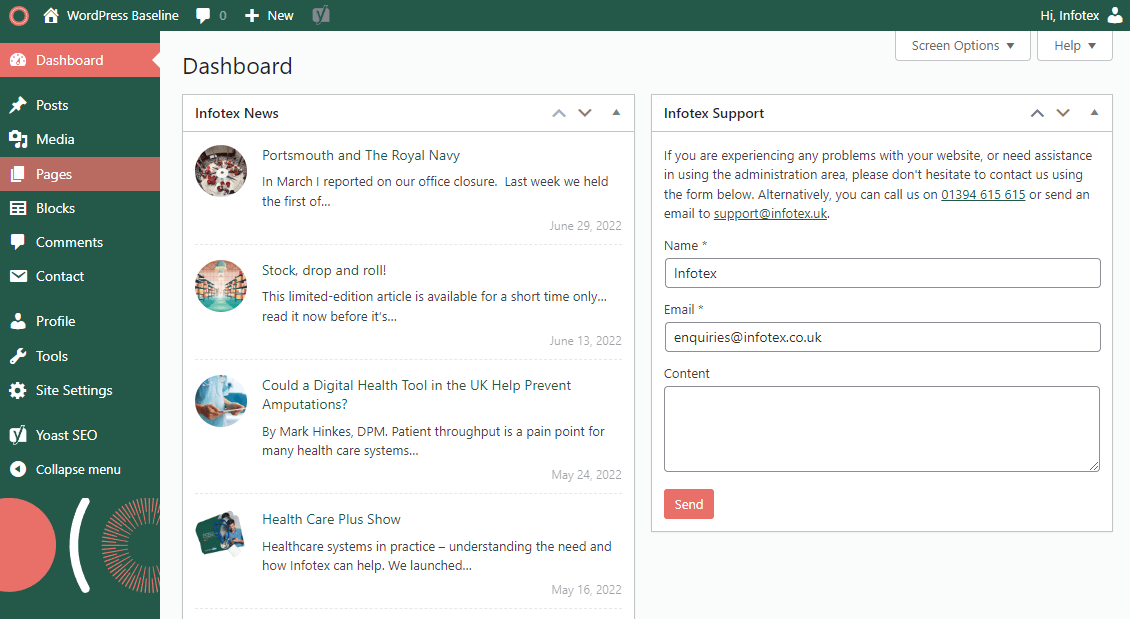
The new-look dashboard will include updated branding, quick access to our support team via a handy form and a news feed, keeping our clients up to date with helpful hints and tips to manage and improve their own site.
WordPress, of course, will continue to allow you to customise your own choice of dashboard widgets, show/hide and reposition any widget should it be required.
This is just the initial release in our plans for improving our WordPress client’s CMS experience and we hope that our clients feel the benefit of these changes.
If you’re considering refreshing your website or just want to chat about how to ensure your site is secure and up to date then get in touch.
The practice of logging into services, also known as authenticating to them, has been around since the 1960’s and in many ways not much has changed in the last half-century which, given the pace of development within IT, is quite staggering.
Even today for most purposes you will simply be asked for a email address and a password. Is it right for that to still be the case?
The problem is that email addresses are relatively easy to find or guess, and people are not very good at generating strong, random passwords. Indeed, all too often a password is little more than a word – perhaps your cat or dog’s name. When lists of passwords actually in use are revealed they all too often have entries like “123456”, “qwerty” & “password” filling the top slots.
Back in the 1960’s the volume and value of data protected by these passwords was relatively low, where it is now quite possible (albeit bad practice) to use the same password across multiple sites. Many of these sites are not administered to the same security standards that we expect from our banks and government bodies, so logins stolen from an insecure website can be used on more secure systems.
So, how are companies increasing security on logins to their sites? There is a computer science theory that a “factor” for authentication must be one of the below:
With a standard login, only knowledge is required, but by adding additional ‘factors’ security is increased. One of the first forms of 2-factor authentication (2FA) was when, in the early 2000’s, credit cards went from a simple swipe to “chip & pin” – thus they changed from a single factor of card possession to 2-factor – possession of the card & knowledge of the PIN.
You may have noticed that more recently a similar change was made when purchasing online via a card as you are now sent a text message to add Possession to the existing Knowledge of the card number.
This is a perfect example of where 2 Factor Authentication (2FA) becomes Multi-Factor Authentication (MFA) as there are scenarios today where all 5 factors are actively being utilised.
In the background the card providers are also doing location checks, i.e. if you purchase an in-store item in London and Manchester within a half an hour, the latter will generally be declined as banks know that it is highly unlikely you could have travelled that distance. This has been refined to the extent that I personally had an online banking transaction blocked a few weeks ago because I used a different broadband connection/device combination that had not been seen on my account before despite using 2 other valid factors to log in.
Using text messages is a very simple and ubiquitous way to provide a 2nd factor, however, security weaknesses in the text message system have reduced the security industry’s recommendation of this.
With the prevalence of smartphones you may now find yourself being asked to use an app to generate the multi-digit one time code, that when combined with the date and time generates a series of numbers that changes every minute as a Time based One Time Passcode (TOTP) as a way of proving Possession of your phone.
Google Authenticator was the first popular app to embody this very simple yet elegant technology that doesn’t even require the phone to be connected to the web (aside from downloading the app initially).
There are other competitors such as Microsoft Authenticator, LastPass Authenticator and some banking apps which work the opposite way in that the website instead sends a challenge to the app on your phone asking for confirmation that you are logging in and requiring your fingerprint to complete the login. This sends a confirmation back to the website, and you are effectively using 3 factors to complete the login: the username/password combination as Knowledge; phone as Possession and the fingerprint as Inherent.
The question that I’m sure many will still ask is whether all this extra effort is really justified?
In 2019 Microsoft research concluded that 2-factor authentication would prevent 99.9% of the over 300 million daily automated login attacks on their platform.
Google similarly concluded that their use of phone-based authentication prevented “100% of automated bots, 96% of bulk phishing attacks, and 76% of targeted attacks”
In the case of systems like Microsoft Authenticator and Google 2-step verification, having your phone popping up asking you to verify your login unexpectedly also provides early warning that someone has just breached your password and that you need to reset it – suffice to say if it pops up unexpectedly never, ever, approve it!
2-factor and multifactor logins are good techniques to improve security which you should be employing wherever practical (for some certifications such as Cyber Essentials it can even be a requirement) but this should not replace the need for your actual password to be strong (i.e. containing upper & lower case letters, numbers and punctuation) and unique as it still remains your first form of defence. You also need to ensure that you keep these additional factors current so when you upgrade your phone ensure to migrate any authenticator apps, if you are going overseas consider whether any services you will need have been locked to your country.
Most website administration areas don’t yet require 2-factor or multifactor logins, but this is gradually changing. WordPress has plugins that can add this capability, so if you would like it added to your site for additional peace of mind please speak with us.
So when you next log in to a site ask yourself whether you can add 2FA to your existing account. You might be surprised, Google, Microsoft, LinkedIn, Facebook, Twitter all offer 2-factor login free of charge.
Discover how our team can help you on your journey.
Talk to us today