
Over the years, I’ve spoken with many companies that have ran into serious problems because they didn’t know where their domain name was registered. These are usually panicked calls – yesterday everything was fine, and now suddenly they very much aren’t.
So, the issue gets traced back to the domain name, but no one knows where it is registered or who has access.
- Sometimes it was a missed renewal notice, and the domain expired.
- Often, it was registered by an ex-employee whose record-keeping was less than stellar.
- Perhaps it was registered by a third party long ago and has been forgotten about.
Domains outlive these short-term relationships, so take a few steps to make sure yours is safe before there is a problem.
What happens if a domain lapses?
Domains are renewed for a specified period of time of up to 10 years into the future. Just before that time is up, you will receive a notification from the registration provider to renew. You pay some more money. Rinse and repeat forever. You’re effectively renting a domain from a domain registry.
However, if the email address the renewal reminder goes to no longer works, or the notification is simply overlooked, it can lead to your domain name expiring. What happens next will vary depending on what type of domain it is – a .com may have different rules from a .co.uk, but the broad steps are similar.
For a .com/.net type of domain, on the day of expiry you can expect the services associated with the domain to stop working. Most notably, this is the nameservers that tell a browser where your website ‘is’ when you type it in the address bar, and where to direct emails to when someone sends to that domain. (Note: the domain and nameservers are completely independent of each other, and separate from your website and email. You could have all four services with completely different companies.)
For a .co.uk / .uk domain things are a little more lenient as there is a 30-day grace period before the services associated with the domain stop working.
At this point you haven’t lost your domain, yet. In either case, from the day that services are suspended you will have at least 30 days to renew. For .com/.net domains providers charge a penalty fee due to the domain being in the “redemption grace period”.
After that point the domain is set to be deleted. This can be between 5-7 days and it can’t be recovered or registered in that window. The domain is then “dropped” and is available for repurchase by anyone. “Drop-catchers” snap up such domains and attempt to sell them on at a premium fee or setup a holding page full of adverts to earn money from the domain’s remaining visitors.
Check Your Domain
Registrar: A company that manages the reservation of domain names.
Domains are renewed for a specified period of time. Just before that time is up, you will receive a notification to renew. You pay some more money. Rinse and repeat forever. You’re effectively renting a domain from a domain registry.
1. Confirm where your domain is registered
Do you know the domain registrar company by name? This could be 123-Reg, GoDaddy, IONOS, NameCheap or any one of scores of others.
To help find where it’s registered, you can lookup domain registration details using various tools. For .uk domain names, they operate under Nominet’s authority and I recommend using their lookup here: https://nominet.uk/lookup/ . Infotex have our own Nominet tag “INFOTEX”, making it easy to identify if we do hold your domain.
For other domains, go to https://lookup.icann.org/en/lookup and enter your domain name, select Lookup, and scroll down to the Registrar Information section. Hopefully, this rings a bell and you can go to step 2.
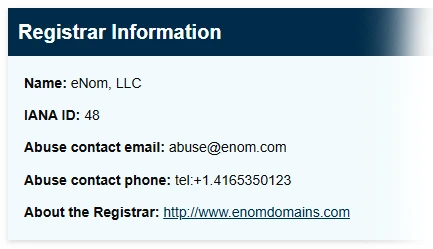
It is important to understand that the registrar you see isn’t always the original place you purchased the domain name from. For example, Infotex use eNom for some of our domains so it would show as them rather than Infotex. In this case, eNom provide a reseller lookup tool where you can check who to contact. Other registrars may not show this information. If you find your domain is with 123-Reg, for example, but have no logins you may need to go through a recovery process to gain access to the domain name. This can be a lengthy process but much easier to do now while things are working. It will require you to provide proof of identity as the owner of the domain, but check the registrar’s help pages for further info.
2. Test the login details
If you manage your domain directly with a registrar make sure you can actually sign in to your registrar’s domain control panel.
This isn’t necessary if you have registered with a 3rd party such as Infotex and are confident they are managing it for you. Some 3rd parties provide a domain management portal so you, as the owner, can log in and check or even take control if needed.
3. Check your contact details
This is two-fold. Firstly, your primary login details to your account should not use an email address which is dependent upon the same domain. i.e. if you are logging in to manage MyDomain.com, your login email should not be sales@MyDomain.com. If that domain has a problem then you may struggle to reset your password or receive the two-factor authentication code. Some providers support secondary email addresses for this reason. Be very careful with this, as alternate emails are very easy to lose if they are only used for one job. Definitely make sure it is not an employee’s personal email address.
Secondly, against each domain will be your contact information. Make sure that is up to date, and you should again consider whether to use a separate contact email to the domain it refers to.
4. Review who has access
I would recommend changing your password now to something strong, and making sure two-factor authentication is turned on, and recovery codes are safely stored. This will stop others who may have needed temporary access in the past from continuing to log in. It will also allow you to closely monitor who has access in the future.
5. Check renewal & lock settings
Is auto-renewal enabled for your domain? Auto-renew is useful up until the payment method expires, but turning it off can be a useful prompt to a) check your logins and payment details ahead of renewal and b) make sure you still want the domain.
Also check that ‘domain lock’ is enabled. For most .com’s this will be on by default. Enabling it is a belt-and-braces prevention of someone transferring your domain out of your account. There would be multiple authentication steps to transfer a domain, such as an email to your admin contact, but while this is enabled a domain can’t be transferred.
“But our agency / IT company / brother in law handles that…”
That may well be true. and in many cases it’s perfectly fine for someone else to manage domains on your behalf, we have thousands of them under our control after all. But, the key point is still visibility.
Even if someone else manages it on your behalf, you should still:
- Know where it’s registered and how to contact them
- Know who ultimately owns it